Security
How dbtrail protects your data — encryption, authentication, network isolation, and access control
Security is foundational to dbtrail. Because dbtrail connects to your MySQL servers and reads binary log data, we take every precaution to ensure your credentials, change data, and infrastructure remain protected at every layer.
This page describes the security measures built into dbtrail's architecture — from how your data is encrypted in transit and at rest, to how access is authenticated, authorized, and audited.
Read-only by design
dbtrail never executes write operations against your MySQL databases. All connections use replication-level access to read binary logs. Recovery operations always produce dry-run SQL — dbtrail will never run SQL against your data on your behalf.
Security Architecture
Every request flows through a layered security architecture. External traffic is TLS-encrypted, internal communication stays within a private VPC with bearer token authentication, and all data stores use encryption at rest.
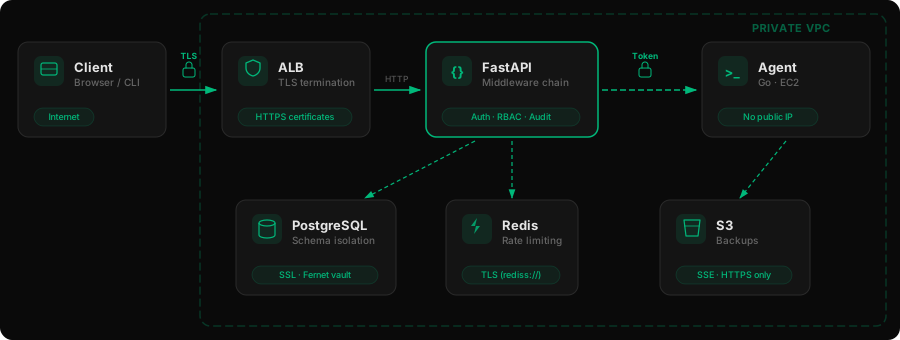
How to read this diagram:
- Lock icons on connections indicate encrypted channels (TLS or bearer token authentication)
- Dashed lines represent internal VPC communication — no traffic crosses the public internet
- The green border on FastAPI highlights it as the security enforcement point where all middleware checks occur
- Every data store (PostgreSQL, Redis, S3) uses its own encryption mechanism
Data Encryption
In Transit
All data moving between components is encrypted or authenticated. No credentials or change data travel in plaintext.
| Channel | Protection | How it works |
|---|---|---|
| Browser / CLI → API | TLS (HTTPS) | All external traffic terminates TLS at the Application Load Balancer. Certificates are automatically managed. |
| API → Agent | Bearer token | Every internal call carries an authentication token in the Authorization header. Agents have no public IP — they're only reachable within the private VPC. |
| API → PostgreSQL | SSL | Database connections use SSL via the connection DSN. Production deployments are configured with certificate verification. |
| API → Redis | TLS | Redis connections use TLS via the rediss:// protocol through ElastiCache in-transit encryption. |
| Agent → S3 | HTTPS | All S3 operations use HTTPS by default through the AWS SDK. IAM role-based authentication — no static credentials. |
| Stripe webhooks | Cryptographic verification | Every webhook payload is cryptographically verified before processing. |
At Rest
Sensitive data is encrypted before it ever reaches the database. dbtrail uses a multi-layered approach depending on the type of data:
Credential Vault (Fernet Encryption)
All stored credentials — MySQL passwords, service tokens, SSH keys, and index DSNs — are encrypted using Fernet symmetric encryption (AES-128-CBC with HMAC-SHA256 integrity verification) before being written to the database.
Credential → Fernet Encrypt → Ciphertext stored in PostgreSQL
                                        ↓
                          Only decrypted in memory when needed
This means that even if someone gains read access to the database, credential values remain encrypted. The encryption key is stored separately from the database and is never committed to code.
What Fernet provides
Fernet guarantees both confidentiality (AES encryption) and integrity (HMAC verification). If encrypted data is tampered with, decryption will fail rather than return corrupted data. Each encrypted value also includes a timestamp, enabling key rotation policies.
API Key Hashing
API keys receive a different treatment — they're hashed, not encrypted, because dbtrail never needs to retrieve the original key:
| Step | What happens |
|---|---|
| Key creation | A cryptographically random key is generated and shown to you once |
| Storage | Only the SHA-256 hash is stored in the database |
| Display | Only the 11-character prefix is kept for identification (e.g., bt_live_a1b...) |
| Authentication | Incoming keys are hashed and compared against stored hashes |
This is the same approach used by GitHub, Stripe, and other platforms — your full API key is never stored anywhere after creation.
Infrastructure Encryption
| Layer | Protection |
|---|---|
| Database volumes | Production deployments configured with EBS volume encryption |
| Backups | S3 server-side encryption (SSE) for backup objects |
| S3 transport | Bucket policy configured to enforce HTTPS-only uploads |
Authentication & Access Control
Every API request passes through a chain of security middleware before reaching the route handler. Each layer can reject the request independently.

The diagram above shows the core security middleware. Additional steps not shown include request ID assignment, plan limit enforcement, and CORS handling (which runs as a separate middleware layer).
Authentication Methods
dbtrail supports two authentication methods, both designed to be secure by default:
JWT tokens — Used by the dashboard and browser-based clients. Tokens include audience validation, expiry enforcement, and are signed with HS256. Refresh tokens rotate automatically with a 10-second reuse interval and a 30-day maximum lifetime.
API keys — Used for programmatic access and MCP integrations. Keys are SHA-256 hashed before storage and shown only once at creation. Authentication works by hashing the incoming key and comparing it to the stored hash — the original key never exists in the database.
Multi-Factor Authentication
When multi-factor authentication is enabled on your account, dbtrail requires TOTP verification for sensitive operations:
- Registering or deleting servers
- Managing API keys
- Managing team members and roles
- Deleting your tenant account
Once you enroll MFA, you cannot bypass it for these actions — a valid TOTP code is always required, even if your session is already authenticated.
Role-Based Access Control
Access within each tenant is governed by a 5-level role hierarchy. Each role inherits all permissions from the roles below it:
owner
  └── admin
        └── operator
              └── analyst
└── viewer| Capability | owner | admin | operator | analyst | viewer |
|---|---|---|---|---|---|
| Billing & tenant deletion | ✓ | ||||
| User & role management | ✓ | ✓ | |||
| API key management | ✓ | ✓ | |||
| Server management | ✓ | ✓ | ✓ | ||
| Recovery (dry-run) | ✓ | ✓ | ✓ | ||
| Query changes | ✓ | ✓ | ✓ | ✓ | |
| View servers & status | ✓ | ✓ | ✓ | ✓ | ✓ |
For the complete permission matrix, see Team Management.
Rate Limiting
All API endpoints are rate-limited using a Redis-backed sliding window algorithm. Limits are enforced at two levels:
- Per-tenant — prevents any single organization from consuming disproportionate resources
- Per-user — prevents any single user from overwhelming the API, even within their own tenant
When rate limits are exceeded, responses include a Retry-After header so your integrations can back off gracefully.
Tenant Isolation
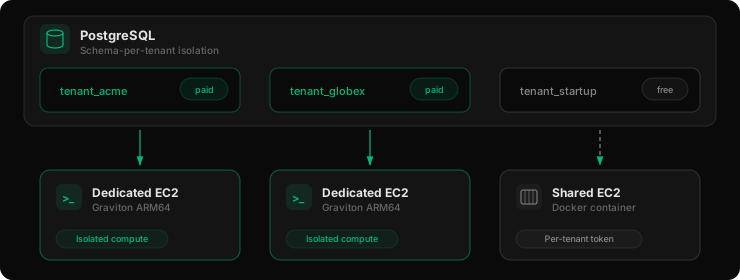
dbtrail isolates tenants at both the database and compute layers. No tenant can access another tenant's data, credentials, or compute resources.
Database Isolation
Every tenant gets its own isolated PostgreSQL schema. All database queries are automatically routed to the authenticated tenant's schema before execution, preventing cross-tenant data access. This means:
- Cross-tenant queries are prevented — the query routing layer scopes every operation to the correct tenant's schema
- Tenant data can be independently backed up or deleted without affecting other tenants
- Each schema contains its own tables for servers, credentials, audit logs, and configuration
Compute Isolation
| Tier | Compute model | Isolation level |
|---|---|---|
| Paid tiers | Dedicated Graviton ARM64 EC2 instance | Full hardware isolation — your agent runs on its own machine with no shared processes |
| Free tier | Docker container on a shared EC2 pool | Process-level isolation with per-tenant service tokens — each container has its own credentials and cannot access other containers |
Paid-tier instances have no public IP address and are only reachable through the private VPC from the dbtrail API. Free-tier containers are similarly restricted, with each container receiving a unique service token for authentication.
Network Security
dbtrail's infrastructure runs entirely within a private AWS VPC. Agent instances — the components that connect to your MySQL servers — have no public IP addresses and are not directly accessible from the internet.
| Control | Implementation |
|---|---|
| Private networking | All agent EC2 instances run in private subnets with no public IP. Only the ALB is internet-facing. |
| Security groups | Ports are restricted by security group rules. Only the agent service port is open, and only to the API. |
| CORS policy | Explicit origin allowlist — no wildcard origins are used with credentials. |
| HSTS | Strict-Transport-Security header with a 2-year max-age forces browsers to use HTTPS. |
| Clickjacking protection | X-Frame-Options: DENY prevents the dashboard from being embedded in iframes. |
| MIME sniffing protection | X-Content-Type-Options: nosniff prevents browsers from interpreting files as a different content type. |
| Signup verification | Cloudflare Turnstile human verification on account registration. |
Secrets Management
dbtrail follows a strict secrets hygiene policy:
- Environment-only — All secrets (database credentials, encryption keys, API tokens) are loaded from environment variables. Nothing is hardcoded in code, configuration files, or Docker images.
- No secrets in logs — Authorization headers and sensitive values are explicitly excluded from request logs and error outputs.
- Non-root processes — The agent runs as a dedicated
bintrailsystem user. Docker containers run as a non-rootappuser. Neither process has elevated privileges. - Cryptographic token generation — Service tokens and API keys are generated using cryptographically secure random number generators.
Audit & Monitoring
Request Audit Logging
All mutating API operations (creates, updates, deletes) are logged asynchronously with the following metadata:
- Who — User ID and tenant
- What — HTTP method and path
- When — Timestamp
- Result — Response status code
Audit logs are stored per-tenant and are accessible to users with analyst-level access or above. They provide a complete trail of who did what and when.
CI/CD Security
Every code change goes through automated security checks before deployment:
| Check | Purpose |
|---|---|
| Dependency scanning | pip-audit scans all Python dependencies against known vulnerability databases (CVEs) |
| Code linting | Static analysis catches common security anti-patterns and code quality issues |
| Automated tests | Full test suite runs on every push and pull request |
Compliance
Data Residency
For hosted plans, the dbtrail agent runs on EC2 instances within dbtrail's private VPC — dedicated instances for paid tiers, shared instances for the free tier. BYOS (Bring Your Own Server) tenants run the agent on their own infrastructure. Binary log data is indexed and stored on the agent's local disk. The control plane does not persist your row data in its own database.
When you query or recover changes, the agent sends matching events through the control plane to your client. The control plane processes them in memory — decoding values, applying column redaction, and post-processing recovery SQL — but does not store row data after the response is delivered.
What the control plane stores at rest:
- Account and billing information
- Server connection metadata (hostnames, ports, replication positions)
- Encrypted credentials in the vault
- Operational stats (schema names, table names, event counts — no row values)
- Audit logs (who did what, when)
The binlog upload feature is an exception: when you upload a binlog file directly, the parsed events (including row data) are stored in the control plane database within your tenant's isolated schema.
GDPR
For the standard hosted flow, dbtrail processes your row-level data in transit (during query and recover operations) but does not persist it on the control plane. For binlog uploads, row data is stored within your tenant's isolated PostgreSQL schema with encryption at rest.
Column redaction rules let you restrict which fields appear in query results, ensuring PII columns are stripped before data reaches the client. Redaction is applied at the API layer by the control plane before returning query responses. Recovery SQL is subject to table-level access control.
SOC 2
SOC 2 Type II certification is on our roadmap. The security controls described on this page — encryption at rest and in transit, role-based access control, audit logging, tenant isolation, and secrets management — align with SOC 2 Trust Service Criteria.
If you're completing a vendor security questionnaire, contact us and we'll help you fill it in.
Data Handling Philosophy
dbtrail is built around a principle of minimal data access:
-
Read-only MySQL access — dbtrail connects to your MySQL servers using replication-level privileges. It reads binary logs to track changes but never modifies your data. No
INSERT,UPDATE, orDELETEqueries are ever executed against your databases. -
Dry-run recovery — When you use the recovery feature (including through AI/MCP), dbtrail generates the SQL statements needed to undo a change, but never executes them. You review and run the recovery SQL yourself, maintaining full control.
-
Tenant-scoped backups — Backup files are stored in S3 with tenant-prefixed paths. Each tenant's backups are isolated and cannot be accessed by other tenants.
-
Column redaction — Access rules let you redact sensitive columns from change tracking results, ensuring that PII or confidential fields are never exposed through the API.
Last updated: April 2026