
One connection, with ProxySQL
Your application keeps one connection and its own MySQL login. ProxySQL sends writes and transactions to your MySQL, and reads to DBTrail, which answers the heavy ones from the copy.
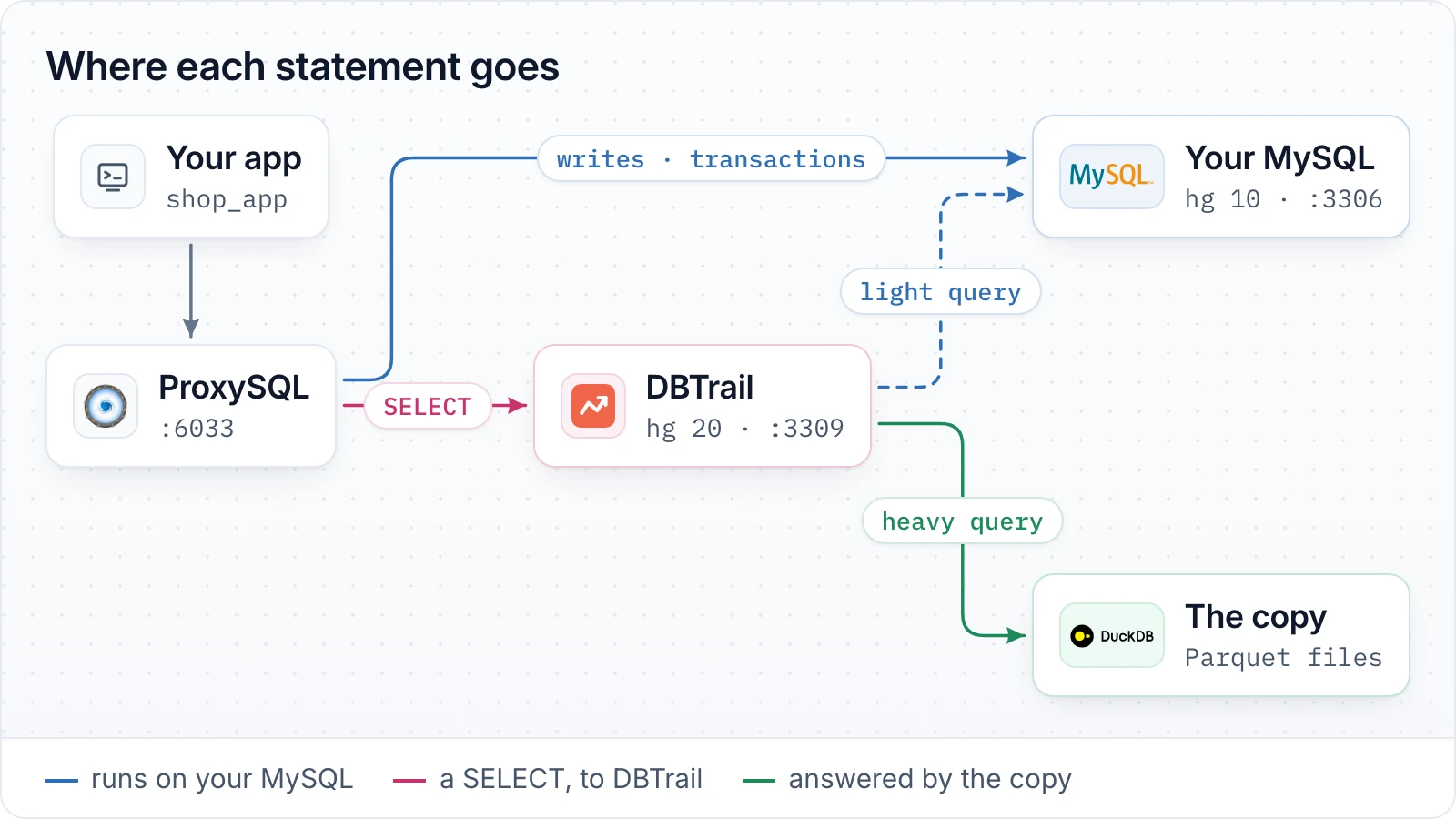
Nothing changes in your application and nothing changes in your MySQL. ProxySQL is what makes the single connection possible: it sends each statement where it belongs, because Engine Routing on its own answers reads only.
Before you start
Have this at hand
- DBTrail with Engine Routing working
- Steps 1 to 5 of Run MySQL and DuckDB on the same connection: a forwarding user, a copy that updates, routing on.
- DBTrail 0.126.0 or newer
- The application login, the monitor login and the card that saves them are new in 0.126.0.
- ProxySQL 3.1 or newer
- Any install. This guide uses its admin interface on port 6032.
- Your application's MySQL username and password
- The ones it uses today. This guide calls them shop_app and app-password.
- Your MySQL monitor account
- The username and password ProxySQL already checks your MySQL with (mysql-monitor_username and mysql-monitor_password). This guide calls them monitor and monitor-password.
- The name of your server in DBTrail
- As the left sidebar shows it. This guide calls it
shop.
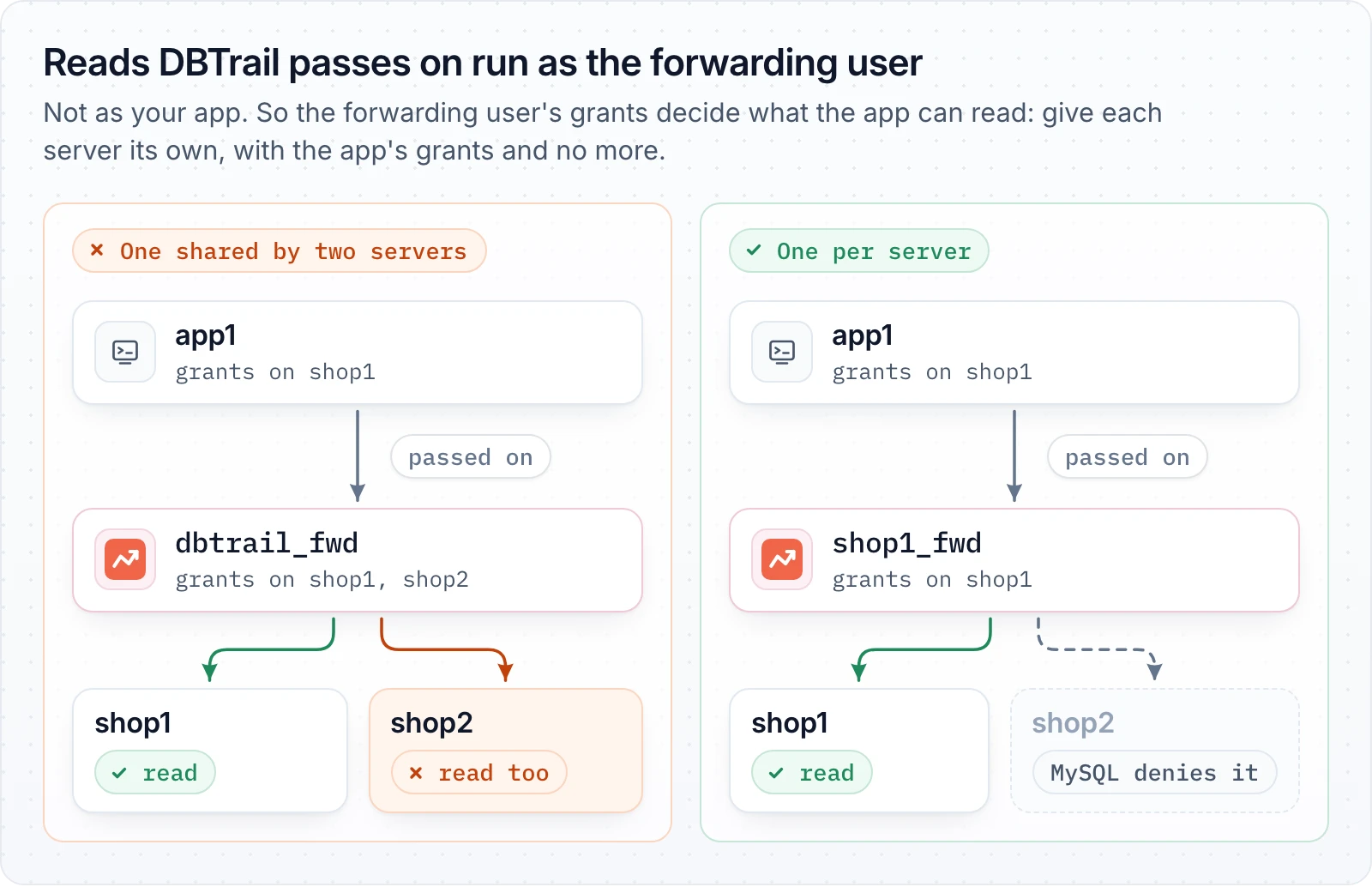
One forwarding user per server, with your application's grants and no more. Measured: an application with no grant on another schema read it through the port, with a forwarding user that had one.
Give DBTrail your application's login
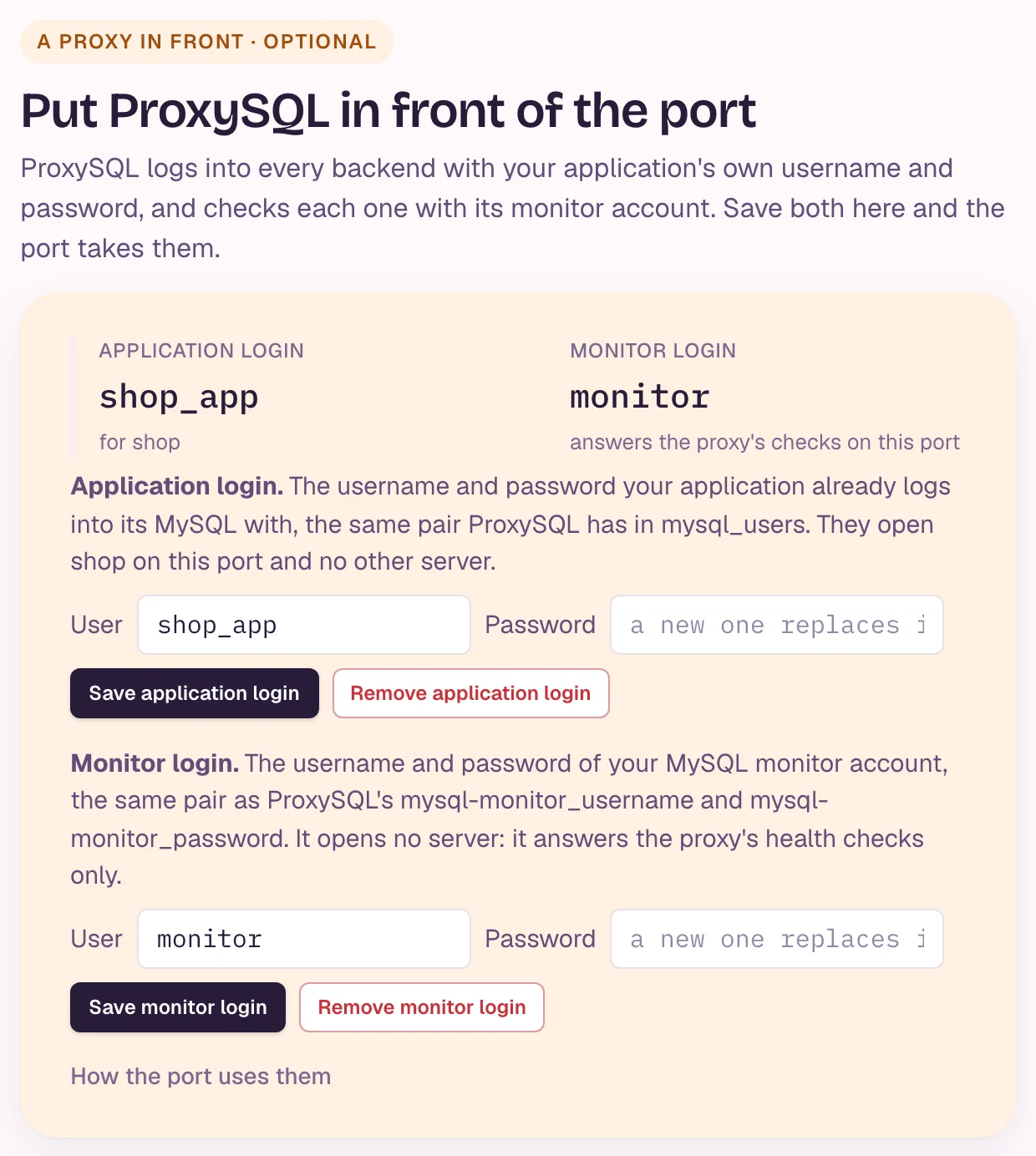
DBTrail web interfaceProxySQL logs into every backend with the username and password your application logged into ProxySQL with, so the port has to take that login.
Pick shop in the left sidebar, open MySQL clients, and under
A proxy in front, save the application's username and password as the
Application login. It opens shop on the port and no other server.
mysql -h 127.0.0.1 -P 3309 -u shop_app -p with the application's password
logs in, and SHOW ROUTER STATUS; answers for shop.
Give DBTrail ProxySQL's monitor login
DBTrail web interfaceProxySQL checks every backend with one monitor username and password, your MySQL included. On the same card, save that pair as the Monitor login. It opens no server.
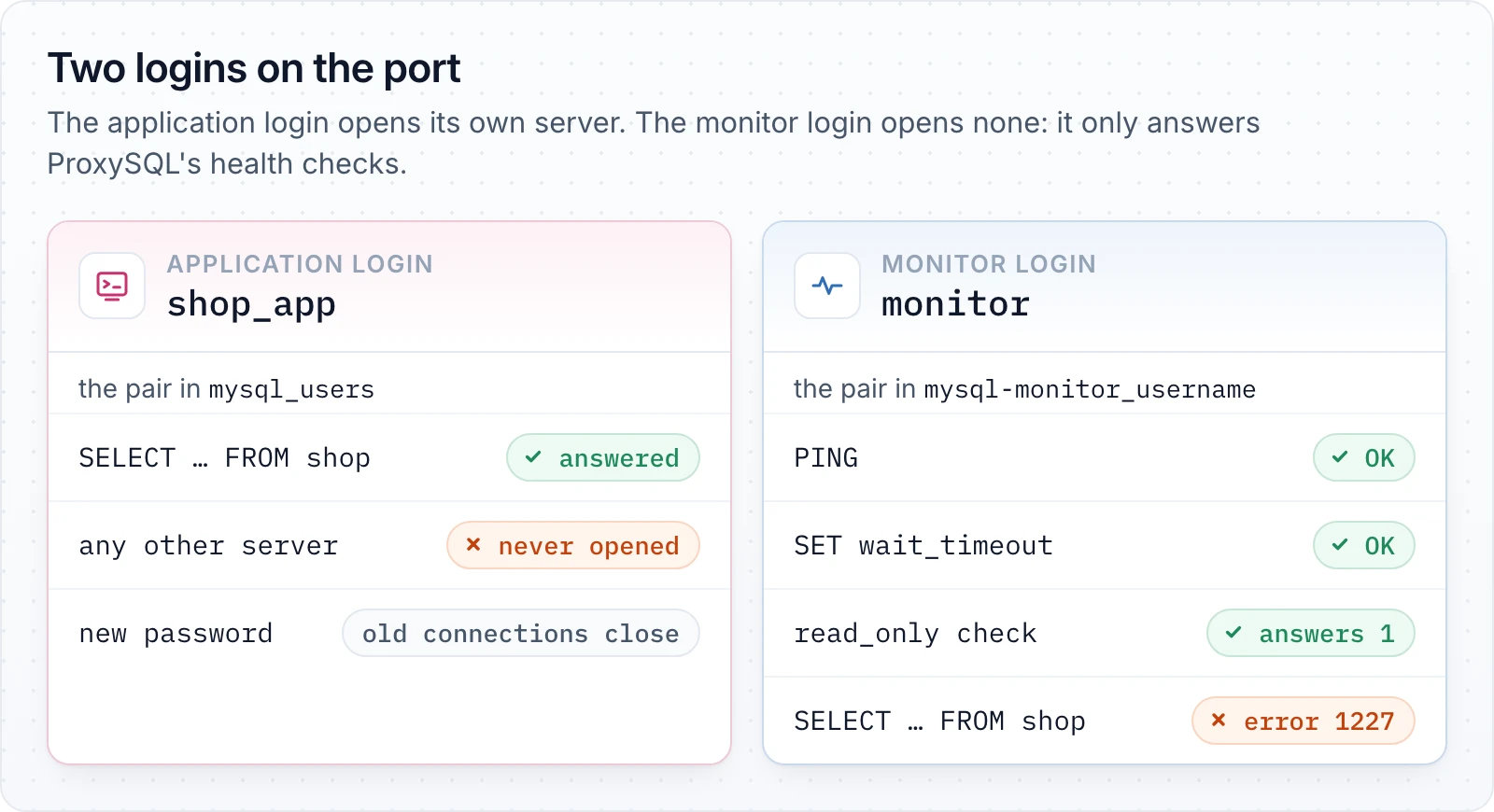
Without it, every check of the port is refused, and both ProxySQL's log and
DBTrail's log fill with Access denied for user 'monitor' every few seconds.
Add both servers to ProxySQL
ProxySQL adminHostgroup 10 is your MySQL, hostgroup 20 is DBTrail.
INSERT INTO mysql_servers (hostgroup_id, hostname, port, comment) VALUES
  (10, 'mysql-host', 3306, 'mysql'),
  (20, 'dbtrail-host', 3309, 'dbtrail');
LOAD MYSQL SERVERS TO RUNTIME; SAVE MYSQL SERVERS TO DISK;
If you already use mysql_replication_hostgroups, DBTrail can sit in the
reader hostgroup: its read_only check answers 1, so ProxySQL keeps it
there. Do not set max_replication_lag on DBTrail's row: DBTrail refuses the
replication-lag check.
Add your application's user
ProxySQL adminThe same login as in step 1. Its default hostgroup is your MySQL, and
transaction_persistent keeps a transaction where it started.
INSERT INTO mysql_users (username, password, default_hostgroup, transaction_persistent)
  VALUES ('shop_app', 'app-password', 10, 1);
LOAD MYSQL USERS TO RUNTIME; SAVE MYSQL USERS TO DISK;
Send reads to DBTrail
ProxySQL adminINSERT INTO mysql_query_rules (rule_id, active, match_digest, destination_hostgroup, apply) VALUES
(1, 1, '^SELECT .* FOR (UPDATE|SHARE)', 10, 1),
(2, 1, '^SELECT ', 20, 1);
LOAD MYSQL QUERY RULES TO RUNTIME; SAVE MYSQL QUERY RULES TO DISK;Everything the rules don't match, writes included, goes to hostgroup 10.
Point your application at ProxySQL
In your applicationHost and port change to ProxySQL's (6033 by default). Username and password stay the same.
In ProxySQL, SELECT hostgroup, port, status FROM runtime_mysql_servers;
shows both servers ONLINE, and
SELECT * FROM monitor.mysql_server_ping_log WHERE port = 3309 ORDER BY time_start_us DESC LIMIT 3;
shows pings with no error. On the DBTrail panel, the DBTrail's copy
figure goes up when your reports run.
What reads the copy, and what doesn't
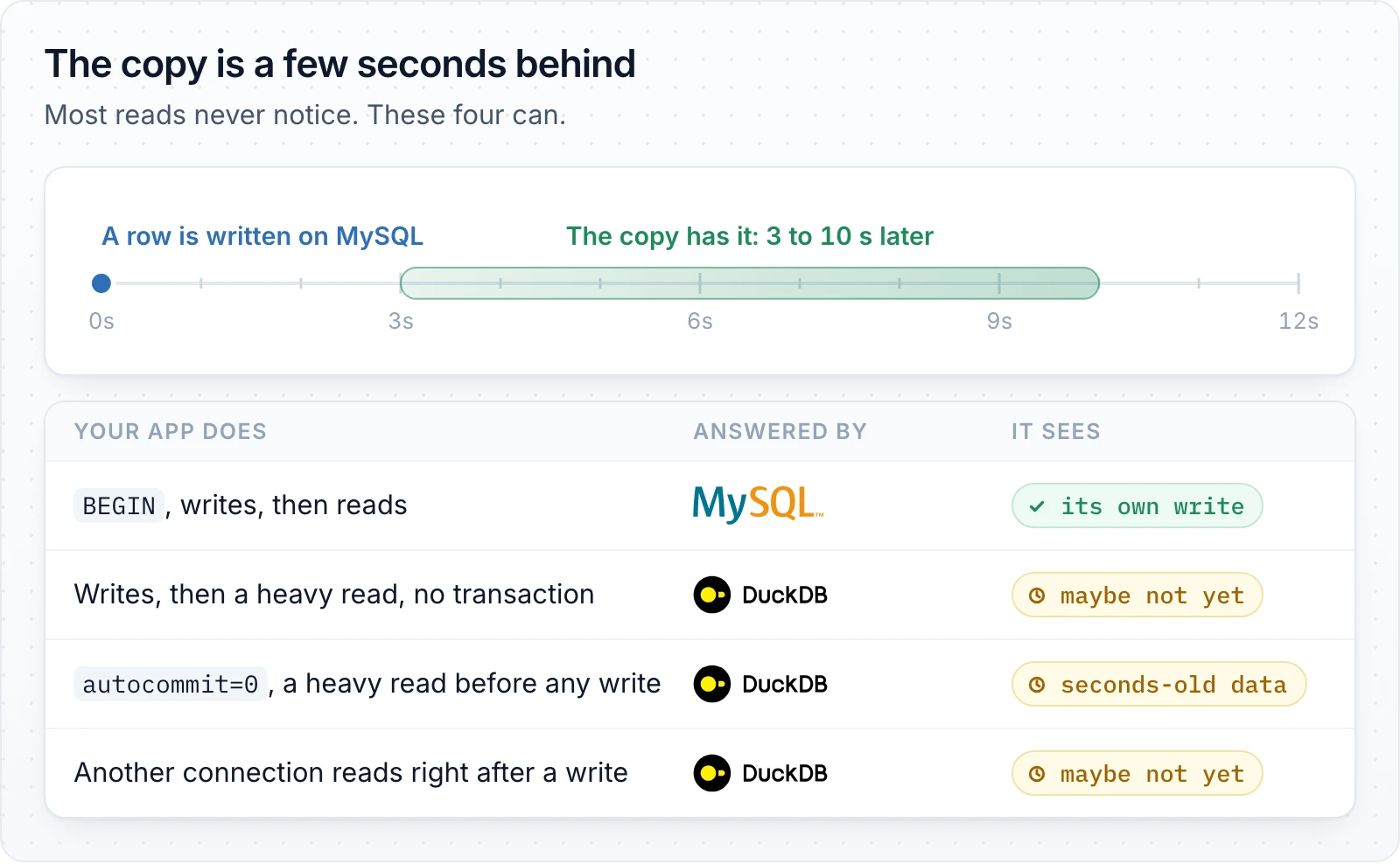
A read that must see a write that just happened belongs in the same
transaction, or on a rule that keeps it on hostgroup 10 (by username,
schemaname or a /* comment */ your application adds).
Good to know
- Several applications, one ProxySQL: give each one its own server in
DBTrail, with its own application login and its own forwarding user. A
login opens its own server only. ProxySQL moves its pooled connections
from one application to another (
COM_CHANGE_USER), and DBTrail checks the new application's password each time: measured with two applications sharing two connections to DBTrail, 320 reads, each answered from its own application's data. - Changing a password in DBTrail closes the connections opened with the old one. ProxySQL opens new ones with the password it has, so change it in ProxySQL too.
CURRENT_USER()on a read DBTrail passes to your MySQL returns DBTrail's forwarding user, not your application's.- DBTrail's port must use its default authentication,
mysql_native_password. Undercaching_sha2_passwordthe application and monitor logins are not offered.