
Install from Linux packages
DBTrail on a Linux host without Docker, from the .deb or .rpm, as a systemd service that starts at boot and restarts after a crash.
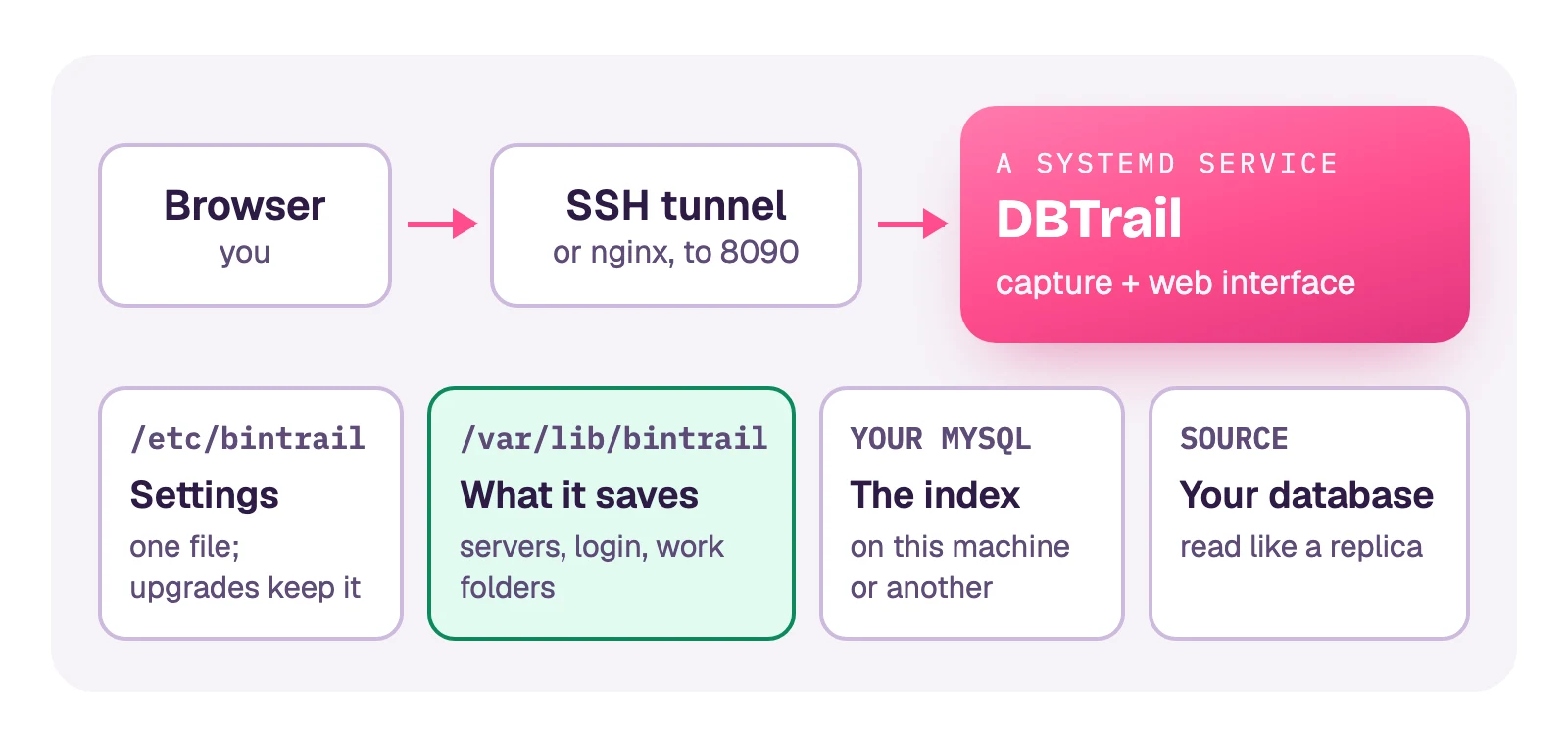
One service runs what the Docker Compose stack runs: capture and the web interface. You add servers in the web interface, as with Compose.
Before you start
- A Linux host with systemd, amd64 or arm64: Debian 12, Ubuntu 22.04, RHEL, Rocky or AlmaLinux 9, Amazon Linux 2023, or newer. On anything older the program does not start.
- An index MySQL, 8.0 or newer, on this machine or another. Its user
creates databases:
bintrail_indexand onebintrail_idx_<id>per server. - DBTrail 0.103.0 or newer. Older packages bring the program and no service.
Install
V=0.103.0
curl -fsSLO https://github.com/dbtrail/dbtrail/releases/download/v$V/bintrail-console_${V}_linux_$(dpkg --print-architecture).deb
sudo apt install ./bintrail-console_${V}_linux_*.debV=0.103.0
A=$(uname -m | sed 's/x86_64/amd64/; s/aarch64/arm64/')
curl -fsSLO https://github.com/dbtrail/dbtrail/releases/download/v$V/bintrail-console_${V}_linux_$A.rpm
sudo dnf install ./bintrail-console_${V}_linux_$A.rpmNothing starts yet. The package put four things on the machine:
bintrail-console.service | The service: starts at boot, restarts after a crash |
/etc/bintrail/bintrail-console.env | Its settings. Upgrades never overwrite this file |
/var/lib/bintrail | What DBTrail saves: your servers, the login, its work folders |
a bintrail account | The user the service runs as. It cannot log in |
Start it
Put the index in the settings file, then start the service:
sudoedit /etc/bintrail/bintrail-console.envBINTRAIL_INDEX_DSN=dbtrail:password@tcp(127.0.0.1:3306)/bintrail_indexsudo systemctl enable --now bintrail-consoleenable makes it start at boot; --now starts it right away. To watch it:
systemctl status bintrail-console
journalctl -u bintrail-console -f
Sign in
The web interface answers on 127.0.0.1:8090, this machine only. From your
own computer, open a tunnel and leave it running:
ssh -L 8090:127.0.0.1:8090 you@the-hostOpen http://127.0.0.1:8090, pick a username and password, and add your
server: Quick Start, Sign in. If your MySQL runs on the
same host as DBTrail, its Host is 127.0.0.1.
For a name everyone on your team can open, with HTTPS: Web interface on a hostname.
For the first copy: mydumper
The first copy reads your whole database with mydumper, which the package does not bring. Install it on this host. Pick the file for your system and processor from the mydumper releases, the version DBTrail is tested with. Two examples, both for amd64:
curl -fsSLO https://github.com/mydumper/mydumper/releases/download/v1.0.3-1/mydumper_1.0.3-1.noble_amd64.deb
sudo apt install ./mydumper_1.0.3-1.noble_amd64.deb
sudo dnf install https://github.com/mydumper/mydumper/releases/download/v1.0.3-1/mydumper-1.0.3-1.el9.x86_64.rpmA full read stages about the size of your data, uncompressed, under
/var/lib/bintrail/baseline-staging. To use another disk, change
BINTRAIL_CONSOLE_BASELINE_STAGING in the settings file and give the
bintrail account that folder.
Upgrade
Install the newer package the same way. The service restarts on the new version by itself, capture resumes from where it stopped, and your settings file is left as it is.
Uninstall
sudo apt remove bintrail-consolesudo dnf remove bintrail-consoleThis stops the service and removes the program. Your settings, your
servers, the login and the snapshots on disk stay, so installing again finds
them; run sudo systemctl enable --now bintrail-console after it. To delete
them too:
sudo rm -rf /var/lib/bintrail /etc/bintrail
sudo userdel bintrail
The index MySQL is yours and is never touched.
More
- Every setting is a line in
/etc/bintrail/bintrail-console.env, with a comment above it. After a change:sudo systemctl restart bintrail-console. A newer version never edits your file; its current text is in/usr/share/bintrail-console/bintrail-console.env. - Changing the service itself (a memory limit, another user):
sudo systemctl edit bintrail-console. That survives upgrades. - Snapshots in S3: give the host an instance role, or put
AWS_ACCESS_KEY_ID,AWS_SECRET_ACCESS_KEYandAWS_REGIONin the settings file. S3 policy. - The MySQL port (Query Parquet with MySQL):
turn it on in the web interface. A second service of the same package,
bintrail-router, answers it on port 3309. The package starts it. - Alerts: uncomment
BINTRAIL_METRICS_ADDRand alert whenbintrail_stream_last_flush_timestamp_secondsgoes stale: Alerts. - Run one DBTrail per source. If this host dies, start it on another one
with the same index and a copy of
/var/lib/bintrail: when the host dies. - The command line (
bintrail query,bintrail recover) is a separate package,bintrail, installed the same way.
Web Interface on a Hostname
Put the DBTrail web interface on console.example.com with TLS, covering DNS, certificate, and the Host header rule that returns 403 until you set it.
Run on Amazon ECS
DBTrail as one Fargate task, with the index in your own MySQL, the saved state on EFS and the web interface behind a load balancer.