DBTrail
Guides

How the Parquet copy works

Where your rows live, what a refresh does to a Parquet file, what it costs, and what dies. Plain words.

Every number here was measured. Where something was not, the page says so.

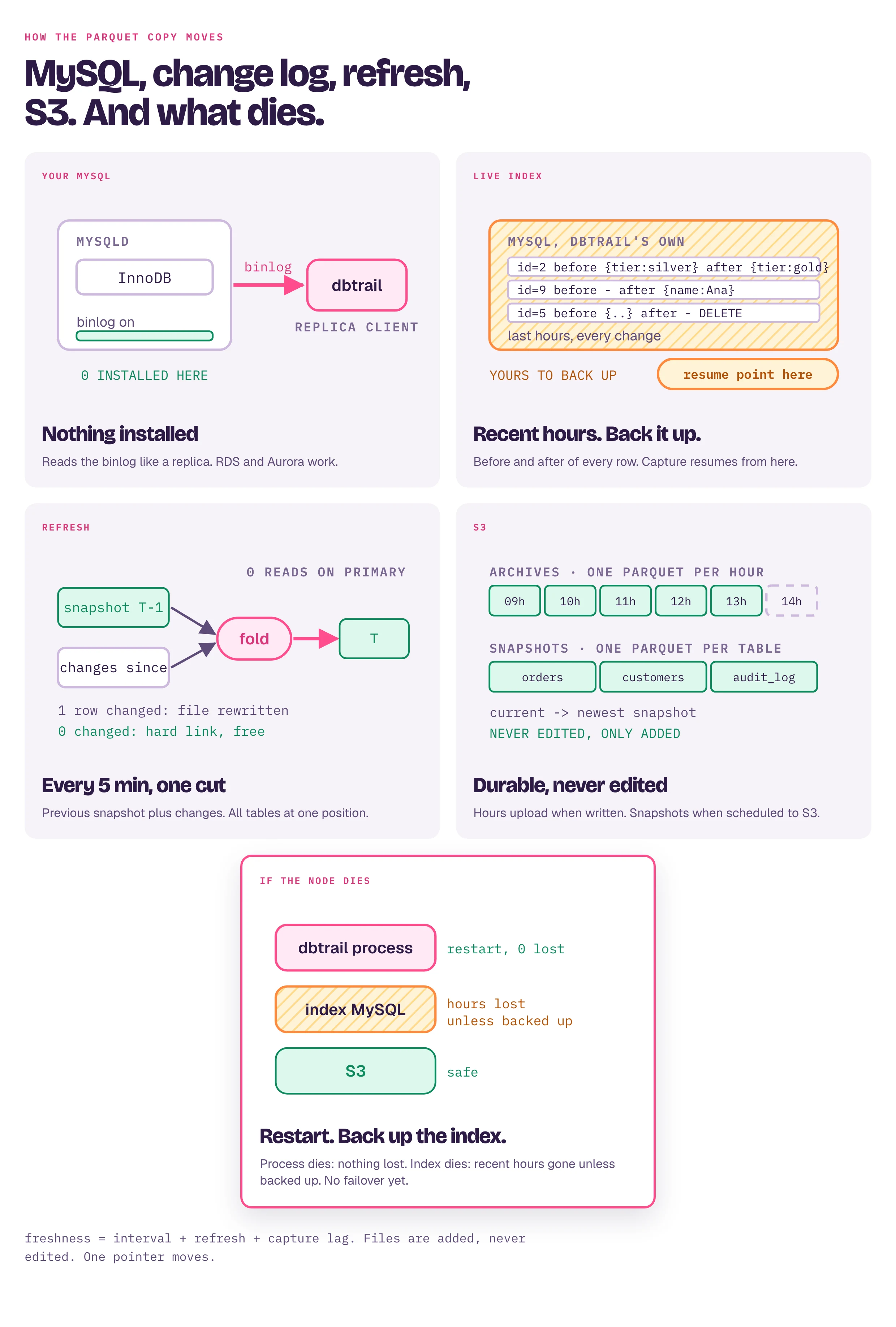
Five cards. Your MySQL: nothing installed, DBTrail reads the binlog like a replica. Live index: DBTrail's own MySQL with the before and after of every row for the last hours, yours to back up, capture resumes from here. Refresh: previous snapshot plus changes go through a fold into the next snapshot every five minutes; a changed table writes only the rows that changed, zero changes is a free hard link. S3: one Parquet per hour of changes and one per table per snapshot, never edited, only added. If the node dies: the process restarts with nothing lost, the index MySQL loses recent hours unless backed up, S3 is safe.

Three places

  • Live index. DBTrail's own MySQL. Every row change lands here in seconds, before and after image. Holds the last hours (a setting). The capture checkpoint is a row here, so this is the one thing you back up.
  • Archives. Each hour older than the window becomes one Parquet file, uploaded to S3, then dropped from the index. Folders named by source, date, hour. No catalog.
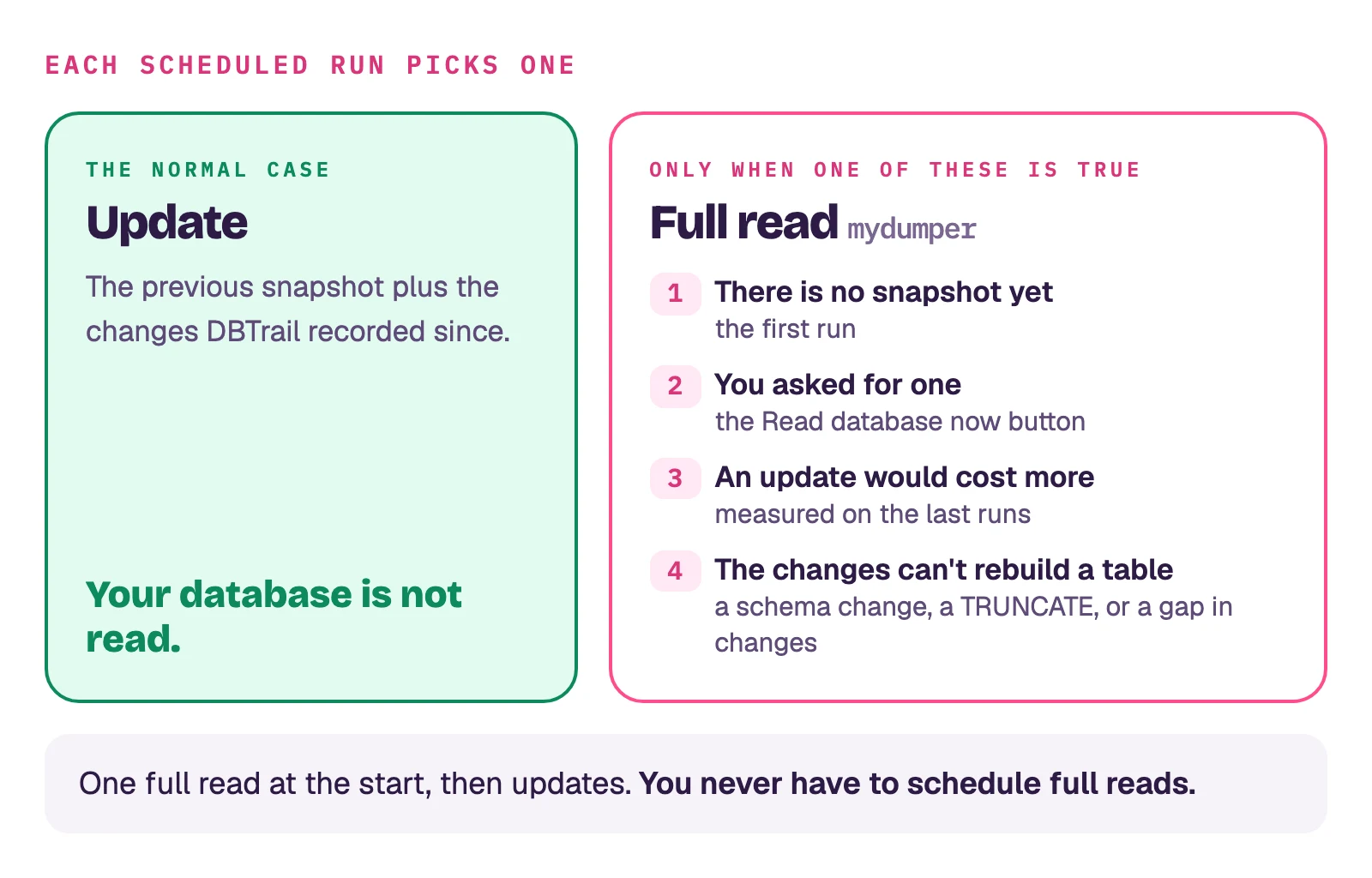
  • Snapshots. Every table as Parquet, one file per table, one folder per snapshot time. The first comes from mydumper; every later one is built from the previous plus the changes since. Your database is never read for it.

.sql to Parquet and back

mydumper writes INSERT INTO t VALUES (a),(b),(c);. DBTrail cuts each tuple into a Parquet row; the CREATE TABLE and the binlog position go in the file's footer. Going back, a .sql backup is regenerated from rows: fresh INSERT statements plus the stored schema. Nothing is kept as SQL.

Decimals are stored as text so they come back exact. verify compares a table rebuilt from Parquet against the live one by fingerprint, so a value changed in transit is a mismatch, not a surprise.

What a refresh does

Per table, keyed by primary key. Steps 2 and 3 are the full rewrite of a table; since v0.84.0 a refresh normally writes the changes beside the table instead (next section) and rewrites only when it has to:

  1. Ask the index which rows changed since the previous snapshot's position. Keep the last change per key.
  2. Read the previous Parquet row by row with DuckDB and write a new file. Row not in the map: copy. Last change DELETE: skip. UPDATE or INSERT: write the new image.
  3. Append the keys that were not in the old file, unless deleted.
before:   id=2  Bob  silver
changes:  id=2 UPDATE gold · id=9 INSERT Ana · id=5 DELETE
after:    id=2  Bob  gold · id=9 Ana · (id=5 gone)

One cut per refresh: every table stops at the same binlog position, local or S3 source alike.

Changes beside the table

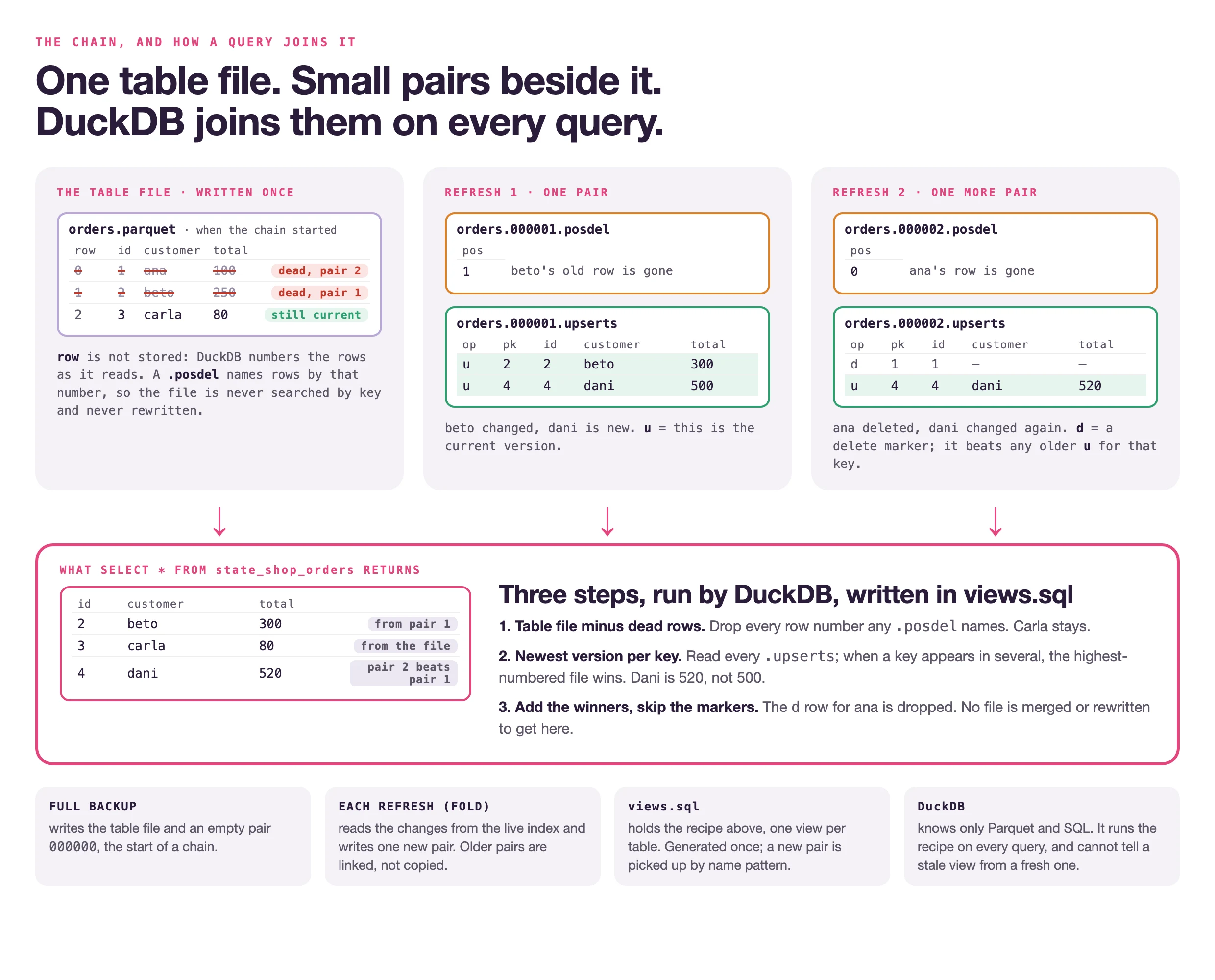
Since v0.84.0 a refresh does not rewrite a table that changed. It keeps the table's Parquet file exactly as it is (linked into the new snapshot) and writes that refresh's changes as one pair of small files next to it, numbered in sequence:

<snapshot>/<schema>/<table>.parquet          the table as it was when the chain started
<snapshot>/<schema>/<table>.000000.posdel    the chain's start: an empty pair, written by the full backup
<snapshot>/<schema>/<table>.000000.upserts   or the full rewrite the table file came from
<snapshot>/<schema>/<table>.000001.posdel    refresh 1: which rows of the table file are no longer current
<snapshot>/<schema>/<table>.000001.upserts   refresh 1: the current version of every row it changed or added, and a marker for each row it deleted
<snapshot>/<schema>/<table>.000002.posdel    refresh 2, and so on
<snapshot>/<schema>/<table>.000002.upserts

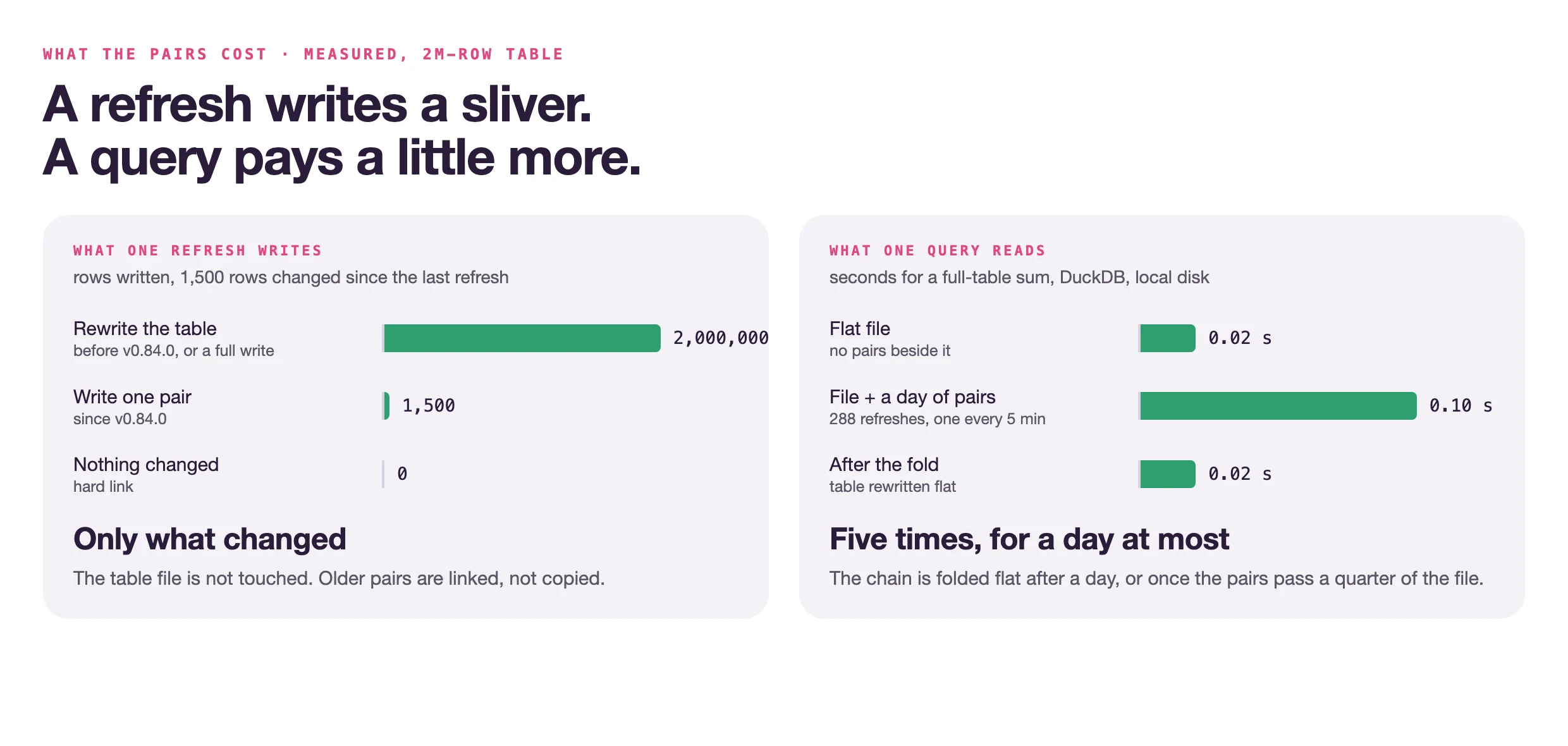
The small files are Parquet too, under another suffix so nothing that lists .parquet files takes one for a table. Table file and chain together give the table at the snapshot: the file minus the rows a .posdel names, plus the newest version of every key found in the .upserts files, unless that version is a delete marker. A .upserts row carries two technical columns besides the table's own: bintrail_pk, the key as one string, and bintrail_op, u for a current row or d for a delete marker. A table that has a column under either name, or named filename or file_row_number, is written in full instead. Each refresh writes only its own pair and links every earlier one forward, so what it writes grows with the rows changed since the previous refresh, never with the chain. A refresh whose window touched nothing writes no pair.

When the table is rewritten in full anyway. The chain starts over, with a new table file and an empty 000000 pair, when the chain's files together pass a quarter of the table file (chains under 1 MiB are left alone), when the chain is a day old, when a window's changes did not fit in memory, when the run crossed a known capture gap, when the previous snapshot is read from S3, or when the previous snapshot was written by v0.83.0 (that version kept one pair per table and rewrote it every refresh; it is folded in once). A schema change refuses the refresh exactly as before, and the full backup that follows starts a new chain.

A long chain is merged by the daemon. Once a chain lists 16 entries (16 plain pairs the first time; a range plus 15 pairs after that), bintrail-console watch runs a compaction job right after the refresh has released the server's slot, never inside the refresh's own time. It merges all but the last pair into one range pair, <table>.000000-000014.posdel and .upserts, holding every dead row number and the newest version of every key. The result waits under <backup dir>/.compact/ and the next refresh links it forward in place of the pairs it merged, so from that snapshot on the chain reads 000000-000014, 000015, 000016, ... while older snapshots keep their plain pairs. The table file is never touched by this job. It is recorded in the daemon log and in the run history file as kind: compact; it does not appear on Backups, which lists the runs that produced a snapshot.

Who reads the chain. The generated DuckDB views (Query in DuckDB) and the console's backup detail. Everything that rebuilds a moment (Time-travel, the .sql export, the time-travel SQL port, a restore) keeps reading the table file and the index, and stays correct because the index still holds every change since that file was written; for such a table it reads a longer window, up to the age of the chain, which is why a chain ends after a day. verify compares table files, so a table whose newest backup is its previous file plus a pair reads INCONCLUSIVE with that reason, and is checked again the next time the table is written in full.

Two things to know. A snapshot written this way must not be read by a DBTrail older than the one that wrote it: an older build starts its event window at the snapshot's time instead of the chain's start and skips changes without an error. And the chain has to travel with its table file: the daemon's upload and bintrail upload carry it, and the snapshot's manifest covers it; a copy made some other way that takes only *.parquet files leaves a table file older than its folder says. Uploads still send the table file and every pair under each new snapshot, so this saves local writes, not upload.

On by default since v0.84.0. To turn it off, bintrail-console watch takes the flag --baseline-table-deltas=false or the environment variable BINTRAIL_BASELINE_TABLE_DELTAS=false (a value that is neither true nor false keeps the default), and bintrail baseline refresh takes --table-deltas=false. There is no console setting for it. Turning it off needs nothing else: the next refresh writes every table in full. Upgrading needs nothing either: the next refresh starts a chain beside each table that changed and says so in the log once per table. Either way, generate the DuckDB views again: why.

When a table changed shape

TRUNCATE, DROP, RENAME TABLE, or a column set that differs from the previous Parquet: that table is refused, and the refresh publishes all or nothing. A scheduled backup then takes a full backup at that slot if the server has a backup location and mydumper; otherwise the slot is skipped with the reason. The full backup covers every table. Adding a column without a dump is not built.

What it costs

  • No changes: free, if the previous snapshot is on local disk. The new snapshot hard-links the old file. Also needs: no destructive DDL, no capture gap. From an S3-only source every table is rewritten, so keep the newest snapshot local.
  • One changed row: a small pair of files beside the table, since v0.84.0. The whole file only when the table is rewritten in full, or with table deltas off: a table is one Parquet file and Parquet cannot be edited in place.
  • A refresh reads less since v0.84.0. Files linked forward unchanged are not hashed again for the snapshot's integrity manifest (the integrity manifest written log line reports files_hashed and files_reused); a table's events are read in index order instead of one lookup per row; and for a table whose primary key is made of integer columns, the rows a window touched are found by DuckDB instead of every key passing through DBTrail (a 5-million-row table with a 100,000-row window: 2.0 s down to 0.1 s).
  • Size. Demo database, seven tables, 300k to 3M rows: 1.4 GB InnoDB became 180 MB Parquet, 7 to 12 times smaller. Synthetic data; real text compresses less. A 1 TB table is not tested.
  • Memory. The change map is in RAM: about 4 KB per changed row for narrow rows, 19 KB for wide ones (TPC-C: 900k rows on one table, 3.6 GB; nine tables in parallel, 8.2 GB). It scales with distinct rows changed in the window, summed over tables refreshed together. A long catch-up window is the risk; spilling to disk is open work.
  • More often is less memory, fewer rows per window. It costs more rewrites and more snapshots stored.

Why not edit the file

Parquet is columnar and compressed: each column sits in compressed blocks with an index at the end. Changing one row means rewriting the block, everything after it, and the index. Every engine that keeps Parquet current writes new files and moves a pointer.

For huge tables the fix is smaller pieces. Splitting a table by key range only helps when changes cluster (inserts at the end, deletes at the start); scattered updates touch most files anyway. Writing only the changed rows as small files beside the table, merged now and then, keeps the cost proportional to the change volume: that is what a refresh does since v0.84.0 (above). Splitting by key range is not shipped.

Freshness

Shortest interval: 5 minutes. That is the schedule floor, not the distance to MySQL. Real distance = interval + refresh time + capture lag. Measured once, under a TPC-C load of about 340 transactions per second on RDS MySQL 8.4 with a pre-release build: commit to visible in DuckDB took 2.7 to 13.2 minutes over nine samples, median 5.9, and grew as the refresh overran its interval. Not yet repeatable (#1646).

What goes to S3

Hours: uploaded when written. Snapshots: when the server's schedule has an S3 destination; the older daemon-wide refresh interval uploads nothing. Local snapshots are pruned only after S3 confirms. A failed upload fails the run and keeps the local copy.

How readers find the newest snapshot

  • current is a symlink next to the snapshot folders, swapped by one rename per refresh.
  • views.sql (Query in DuckDB) is generated once and reads current/<schema>/<table>.parquet and, since v0.84.0, the small files beside it. It never changes; the pointer does. Generate it again after upgrading: views and the chain.

One rename is not a transaction across views: a query reading two tables across the swap can see two snapshots.

If something dies

  • DBTrail process. Restart. Archives and uploaded snapshots are on S3; capture resumes from its checkpoint and re-reads the binlog. The guarantee is "the source still has that binlog", not a sync inside DBTrail.
  • Local snapshot disk. The next refresh reads from S3 and rewrites every table once.
  • Live index MySQL. Recent hours and the checkpoint are gone unless it had backups. restore-index rebuilds the rest from S3. Put the archive bucket under S3 Object Lock.
  • Power cut. The Parquet writer does not force a sync; a file written just before and not yet uploaded can be truncated. The snapshot manifest carries a digest per file, so a truncated file fails the check instead of being read.
  • Failover is manual today. Automatic would need the index MySQL highly available on its own, a second node with a lock so only one captures, and a pull of the newest snapshot from S3 before its first refresh.

Checking the copy

verify compares content fingerprints against the live table. A drill loads the regenerated .sql into a scratch MySQL and counts rows.

On this page