Recovery
Restore accidentally changed rows to any past moment — row-level point-in-time recovery with human-in-the-loop review
Recovery is dbtrail's row-level point-in-time restore. When a single row (or a handful of rows) is wrong — a deleted customer, a reverted UPDATE, an unintended INSERT — you don't need to restore a whole database. dbtrail indexes every row change, so you can pick any moment in the past and restore that specific row to its state at that moment.
Row-level vs. whole-database restore
- Use recovery (this guide) to restore specific rows — typical for "I just deleted the wrong user" type incidents.
- Use PITR to reconstruct whole tables or the whole database at a target time — typical for schema-wide corruption, large accidental batch operations, or cloning for audit.
Both reach into the same underlying binlog index and base snapshots, just at different granularities.
Human-in-the-loop by design
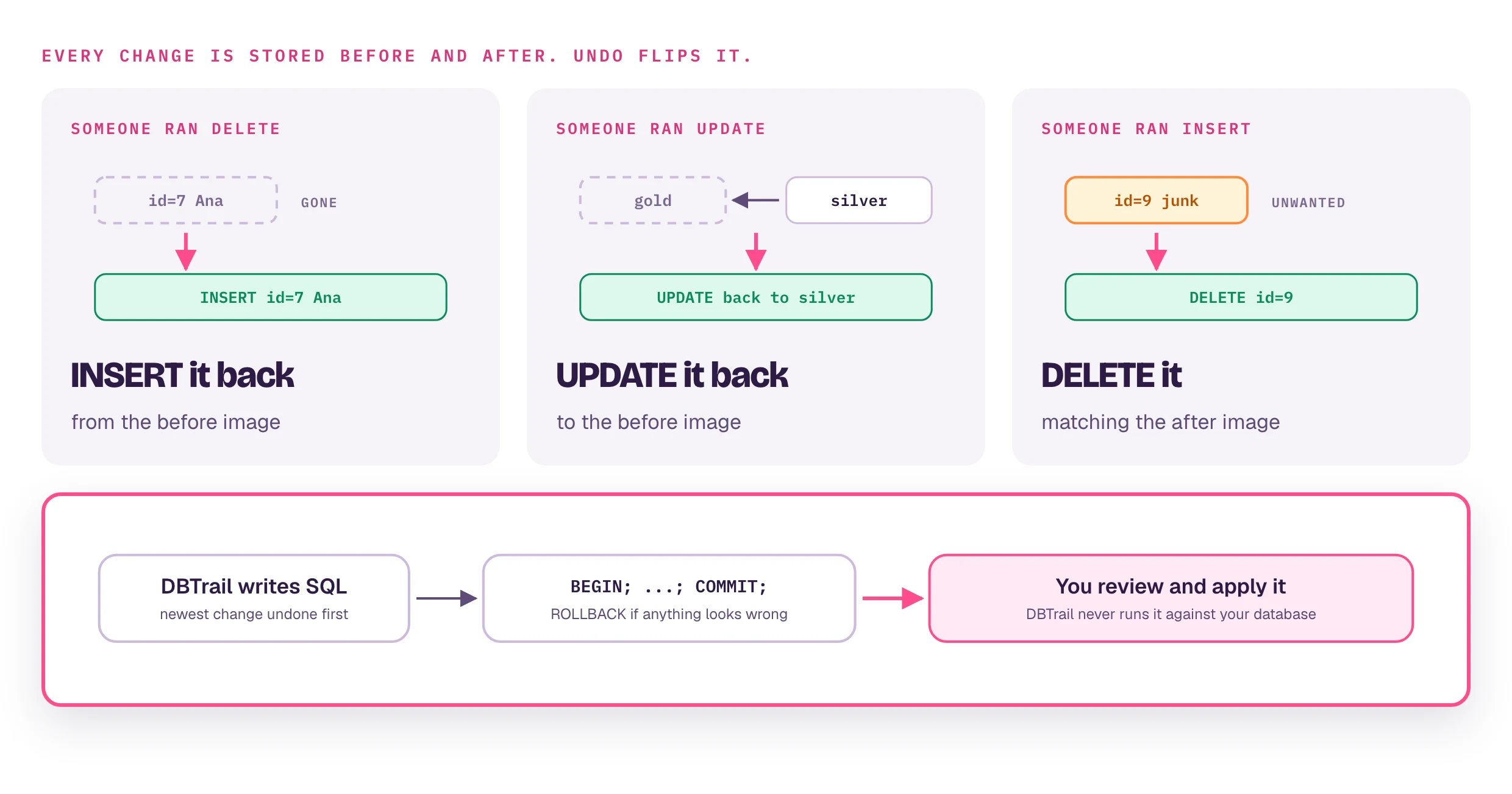
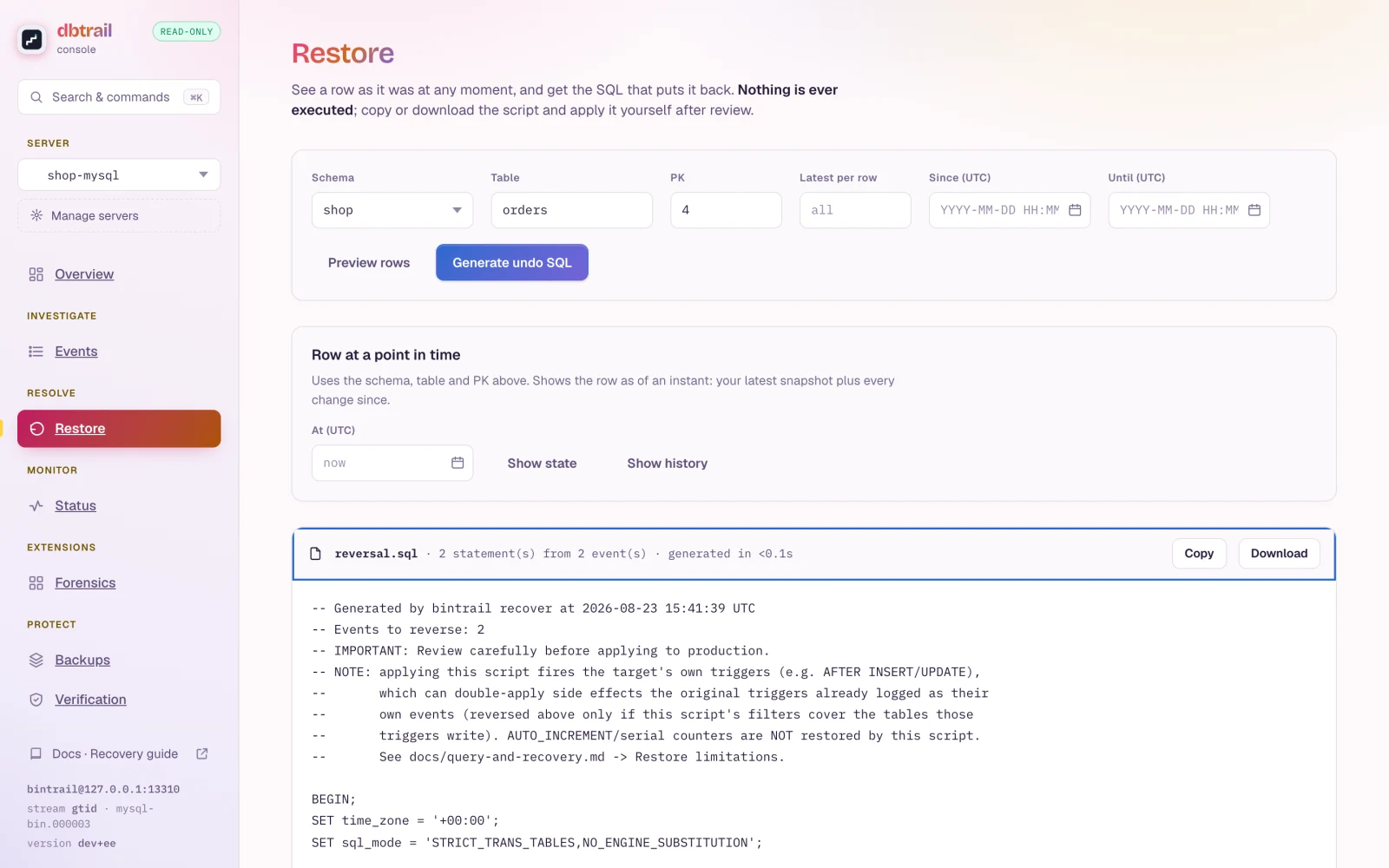
Recovery always operates in dry-run mode — dbtrail generates the SQL but never executes it against your database. A human reviews the statements and applies them. This is deliberate: an automated writer that misreads intent would be a bigger incident than the one it was trying to fix. The review step is the safety feature.
How recovery works
dbtrail indexes the full before/after state of every row change. These before/after row images are captured by the open-source bintrail CLI as it parses MySQL binary log events. When you request recovery, dbtrail uses this data to generate the inverse SQL:
| Original event | Recovery action |
|---|---|
| DELETE | INSERT INTO ... using the row_before values |
| UPDATE | UPDATE ... SET reverting to row_before values |
| INSERT | DELETE FROM ... matching the row_after values |
The generated SQL uses primary-key-only WHERE clauses when a schema snapshot is available, falling back to all-columns WHERE otherwise.
Foreign key awareness
Recovery is FK-aware by default. When you recover a deleted row, dbtrail automatically checks whether any parent rows referenced by foreign keys were also deleted — and includes them in the recovery SQL in the correct order.
Why this matters
A naive single-table recovery can fail silently. If you deleted a customer and their orders in the same transaction, re-inserting the orders first would violate the foreign key constraint on orders.customer_id. dbtrail prevents this by:
- Resolving parent rows — walks up the FK chain to find deleted parents that must be restored first (enabled by default via
resolve_fk) - Optionally including dependents — walks down the FK chain to include deleted child rows (opt-in via
include_dependents) - Topologically sorting — uses Kahn's algorithm to order INSERT statements so parents are always restored before children
- Handling circular and self-referencing FKs — when a cycle is detected (e.g.
employees.manager_id → employees.id), the SQL is wrapped withSET FOREIGN_KEY_CHECKS=0/SET FOREIGN_KEY_CHECKS=1
Resolution is recursive up to 5 levels deep. If your schema has deeper FK chains, the remaining rows are skipped with a warning.
Example
Given this schema:
customers (id, name)
orders (id, customer_id → customers.id, total)
order_items (id, order_id → orders.id, product, qty)Recovering a deleted customer with include_dependents: true generates:
-- FK-aware recovery generated by bintrail SaaS
-- Recovery steps: 4
BEGIN;
-- Step 1: customers (pk={'id': 42}) — requested recovery target
INSERT INTO `mydb`.`customers` (`id`, `name`) VALUES (42, 'Acme Corp');
-- Step 2: orders (pk={'id': 100}) — dependent of mydb.customers via customer_id
INSERT INTO `mydb`.`orders` (`id`, `customer_id`, `total`) VALUES (100, 42, 250.00);
-- Step 3: orders (pk={'id': 101}) — dependent of mydb.customers via customer_id
INSERT INTO `mydb`.`orders` (`id`, `customer_id`, `total`) VALUES (101, 42, 75.00);
-- Step 4: order_items (pk={'id': 500}) — dependent of mydb.orders via order_id
INSERT INTO `mydb`.`order_items` (`id`, `order_id`, `product`, `qty`) VALUES (500, 100, 'Widget', 3);
COMMIT;Notice that customers is inserted before orders, and orders before order_items — matching the FK dependency order.
Set resolve_fk: false to get single-table recovery without any FK resolution.
MySQL 8.x CASCADE limitation
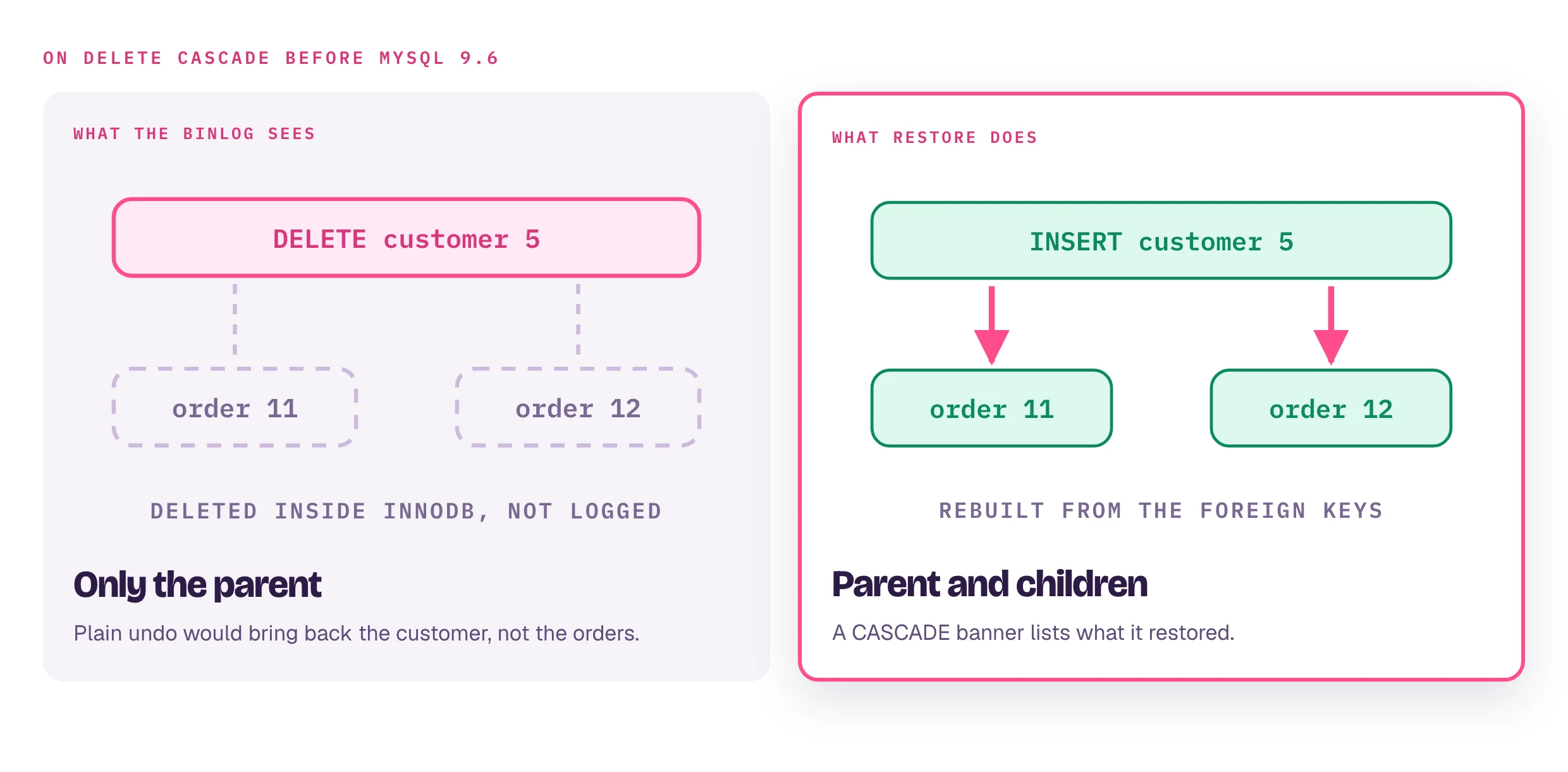
ON DELETE CASCADE is invisible to the binlog on MySQL 8.x
When a parent row is deleted and the foreign key uses ON DELETE CASCADE, InnoDB handles the child deletions entirely inside the storage engine — they never appear in the binary log. This is a MySQL/InnoDB limitation, not a bintrail or dbtrail limitation. Since bintrail reads the binlog, cascaded child deletions are invisible to both query and recover.
This means:
include_dependents: truewill not find child rows that were removed by CASCADE (there are no binlog events to discover)- Querying the child table for recent DELETEs will not show CASCADE deletions
- Only the parent DELETE is visible to dbtrail
Workaround: Replace ON DELETE CASCADE with ON DELETE RESTRICT and handle child deletions explicitly in application code or a BEFORE DELETE trigger on the parent table. Explicit DELETEs are logged in the binlog and fully visible to dbtrail.
MySQL 9.6+: This limitation is resolved — cascade enforcement was moved to the SQL layer, making cascaded operations visible to the binlog.
Using recovery
Via Claude (recommended)
The fastest way to recover a row is to ask Claude in plain English:
"Generate recovery SQL for the deleted order 12345 in the orders table"
"Undo the UPDATE on user 42 from yesterday around 3 PM"
Claude calls the recover tool and shows you the generated SQL for review. You apply it (or not) — dbtrail never writes to your database itself.
Claude is the recommended interface for recovery because the natural-language flow maps directly to how incidents actually come up ("a customer said their profile got wiped yesterday afternoon"). See Connect Claude to wire it up.
Via the dashboard
The Dashboard → Query page surfaces a Recover button on any row change event. Same output as the API, with a diff view so you can see before/after values inline.
Via the API
If you prefer programmatic access or want to integrate recovery into your own runbooks, the recover endpoint returns the generated SQL, an affected row count, and a list of operations. See the Recover API reference for full request/response details.
Recovery parameters
| Parameter | Required | Description |
|---|---|---|
server_id | yes | UUID of the registered server |
schema | yes | Database schema name |
table | yes | Table name |
primary_keys | no | Array of primary key values to recover |
target_time | no | ISO 8601 point-in-time to recover to |
resolve_fk | no | Auto-resolve missing FK parent rows (default: true) |
include_dependents | no | Also recover deleted child rows (default: false) |
Best practices
- Always review the SQL before executing — recovery SQL can have unintended side effects if the data has changed since the original event
- Use specific filters — narrow down by table, primary key, and time range to avoid generating more statements than needed
- Test in a staging environment first when recovering large batches
- Run inside a transaction — the generated SQL is already wrapped in
BEGIN/COMMIT, so you canROLLBACKif something looks wrong
Permissions
Recovery requires the recover:execute permission, available to owners, admins, and operators.