
PostgreSQL (Beta)
Capture changes from PostgreSQL, added from the web interface, nothing installed in your server
+ Add server → source type PostgreSQL, same web interface as MySQL. Beta: verified end to end against PostgreSQL 14 to 17 in CI.
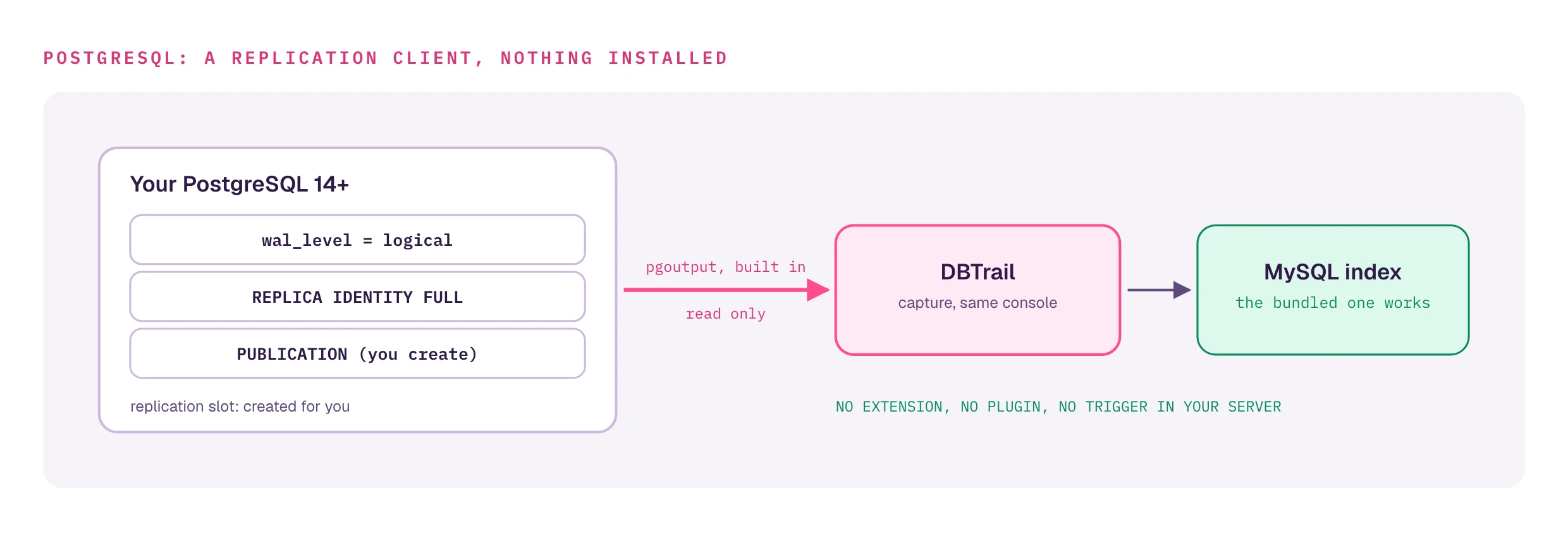
Nothing is installed in your PostgreSQL server
DBTrail is an ordinary logical-replication client using the built-in
pgoutput plugin. No output plugin, CREATE EXTENSION or event trigger. It
never writes to your source. The index stays MySQL; a PostgreSQL index is
not supported.
Prerequisites
Once, on the source, as a superuser or the managed-database master user:
wal_level = logical(server restart).- A role with
REPLICATION. REPLICA IDENTITY FULLon every captured table: the analog of MySQL'sbinlog_row_image = FULL.- A
PUBLICATIONover those tables. DBTrail validates it, never creates it. - Strongly recommended:
max_slot_wal_keep_sizebounded (for example'10GB'). Unlimited, a stalled slot pins WAL until the source disk fills.
Exact SQL: PostgreSQL-side setup. RDS, Aurora, Cloud SQL: Managed PostgreSQL.
Add it from the web interface
With the Compose stack running:
- + Add server → Source type: PostgreSQL. Extra fields appear: Database, Replication slot, Publication.
- Host, port, user, password, database, a slot name, your publication. Optionally Schemas.
- Save. Preflight checks
wal_level, publication coverage,REPLICA IDENTITY FULLand slot health; failures become remediation cards. A dedicated index is provisioned and capture starts, resuming on restart.
The source type is fixed once saved: to change it, delete and re-create the server. More: Servers.
What the web interface shows
- Position as an LSN, labeled "PostgreSQL · logical replication".
- Replication health on Status: retained WAL, margin before invalidation,
tables not at
REPLICA IDENTITY FULL, with a freshness indicator. Status. - Permanent-loss badge when the slot is invalidated: the index is valid up to that point and capture must be re-baselined.
- No session attribution: logical replication carries no backend connection id, and the Events page says so.
Recovery and time-travel
Same index, same downstream: Events, dry-run undo SQL from Restore, and a row's state at any past moment with a backup configured.
AS OF from psql, over the PostgreSQL wire protocol:
SELECT * FROM _flashback.orders AS OF '5 minutes ago' WHERE id = 42;Setup: querying and recovering.
Beta limits: full-table reconstruct is not wired for PostgreSQL yet
(single-row works), and sequences need setval after a restore.
All of them: limitations.
Headless
bintrail-pg: standalone capture binary plus the shared read and recovery
commands, as a Docker image, .deb/.rpm, or from source.
docs/postgres.md.