
Schema changes
What happens when a column is added, changed or dropped on your database, where every DDL is listed, and which statements leave no rows to undo.
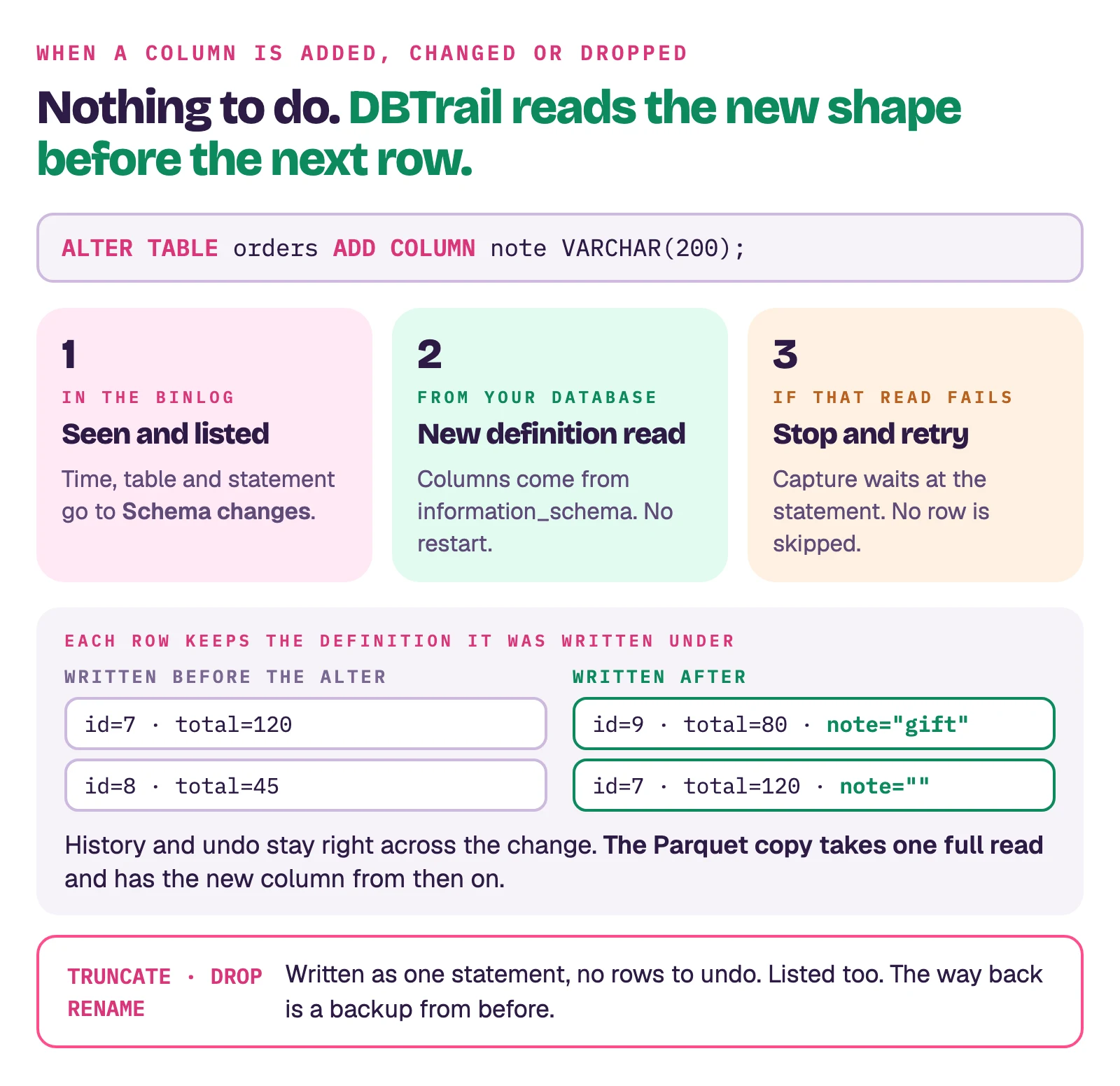
Short answer: ALTER TABLE ... ADD COLUMN, MODIFY COLUMN and DROP COLUMN
need nothing from you. DBTrail sees the statement in the binlog, reads the
table's new definition from your database at that moment, and decodes every
row that follows with it. Rows written before the change keep the definition
they were written under, so their history and their undo scripts stay right.
What DBTrail does with a DDL
DBTrail reads the binlog like a replica, and the binlog carries DDL as text. When one goes by:
- It is recorded. Time, table, statement and binlog position land in the Schema changes list (below), before anything else happens.
- The new definition is read. DBTrail reads the table's columns from your
database (
information_schema), which already reflects the change, and switches to them for the next row. No manual step, no restart. - If that read fails, capture stops at the statement and retries. It does not keep going with the old definition, because every row of that table after the change would be decoded wrong or skipped, and the gap would be permanent. Under the web interface the daemon restarts capture from just before the statement, with a growing pause between attempts, until the read goes through. Nothing is skipped.
Statements DBTrail recognizes: CREATE TABLE, ALTER TABLE, DROP TABLE,
RENAME TABLE, TRUNCATE TABLE, and MariaDB's CREATE OR REPLACE TABLE.
Where to see them
Web interface → Investigate → Schema changes: one row per statement, with
the time it ran on your database, the table, a badge for the type, the binlog
position and the statement text. Filter by schema, table, type and time range.
A DROP or RENAME that names several tables is listed once per table.
From Claude, the list_schema_changes
tool answers "any ALTER on orders this week?" from the same list. On the
command line, dbtrail status counts them under Restore Coverage.
What changes for each part of DBTrail
Row history and undo. Nothing. Each row is decoded with the definition in
effect when it was written, so a row changed before an ADD COLUMN shows the
columns it had, and the undo script for it uses those columns.
The Parquet copy. The next update stops for an altered table: the previous snapshot and the new rows no longer have the same columns, and DBTrail publishes nothing rather than a table that looks right and is wrong. If full reads are allowed, that run reads the whole database instead, in the same slot, and the copy has the new columns from then on. If not, the slot is skipped, the Snapshots page says why, and the copy waits for the next full read. Details in How the Parquet copy works.
A new table. CREATE TABLE is recorded and its rows are captured from the
first insert. It joins the Parquet copy with the next full read; DBTrail
starts one on its own to include it, within a daily bound, and the
Snapshots page says when the table is not in the copy yet.
Restoring a table to a moment (Restore Tables to a Moment). A restore to a moment before a column was added works when the index can show the column did not exist yet at that moment. When it cannot, the restore is refused with a message naming the column, instead of producing a table with a column it never had. A new full snapshot clears it.
Statements that leave no rows to undo
TRUNCATE TABLE, DROP TABLE, RENAME TABLE and CREATE OR REPLACE TABLE
are written to the binlog as one statement, not row by row (by design,
MySQL). There is nothing for Recovery to reverse. They are
listed under Schema changes, and the way back is
a backup from before. A restore whose window crosses one of
them is refused, naming the statement and its time, rather than bringing back
rows that the statement removed.
Online schema change tools (pt-online-schema-change, gh-ost) build a new
table, copy the rows into it, and finish with a RENAME TABLE. DBTrail sees
exactly that: the copy's inserts are captured like any other writes, and the
final rename counts as one of the statements above for the renamed table.