dbtrail
dbtrail EE

Audit trail

What the audit feature records, the JSONL format, the fail-closed startup policy, and how write failures surface

The audit trail is an enterprise feature that records every auditable dbtrail operation as one JSON line in a local file. It is offline by design: dbtrail writes the file; you ship it to your SIEM the same way you ship any other log.

Enterprise feature

The audit trail activates only when your license carries the audit feature (dbtrail-ee license shows your feature list). Without it, nothing is written and there is no overhead. See Licensing and Enterprise features.

What it records

dbtrail never executes SQL against your databases, so an audit event is one of two things: historical data access (a query, a time-travel read, a reconstruct) or mutation-artifact generation (a recover run producing a reversal script; dbtrail generates it, never runs it).

Each event carries:

FieldMeaning
TimeUTC timestamp (RFC 3339), stamped when the event is recorded.
SurfaceWhere the operation entered: cli, mcp, shim, or console.
ActorWho ran it. Locally-invoked surfaces record os:<user> (plus profile:<name> when an RBAC profile is active); authenticated network surfaces record their authenticated user.
ActionThe operation, e.g. query.run, recover.generate.
SchemaTarget/filter schema (may be empty).
TableTarget/filter table (may be empty).
DetailAction-specific fields (result counts, dry_run, gtid, output path, format, …).

Emission covers the surfaces that serve historical row data: the CLI (query, recover, recover-cascade, reconstruct, verify --explain), the MCP tools, the time-travel shim, and the web console (including its RBAC denials, see RBAC). Metadata-only reads and the capture plane are deliberately out of scope.

Where it writes

The destination is resolved at startup:

  1. $DBTRAIL_AUDIT_LOG, if set.
  2. Otherwise the default: /var/log/dbtrail/audit.jsonl.

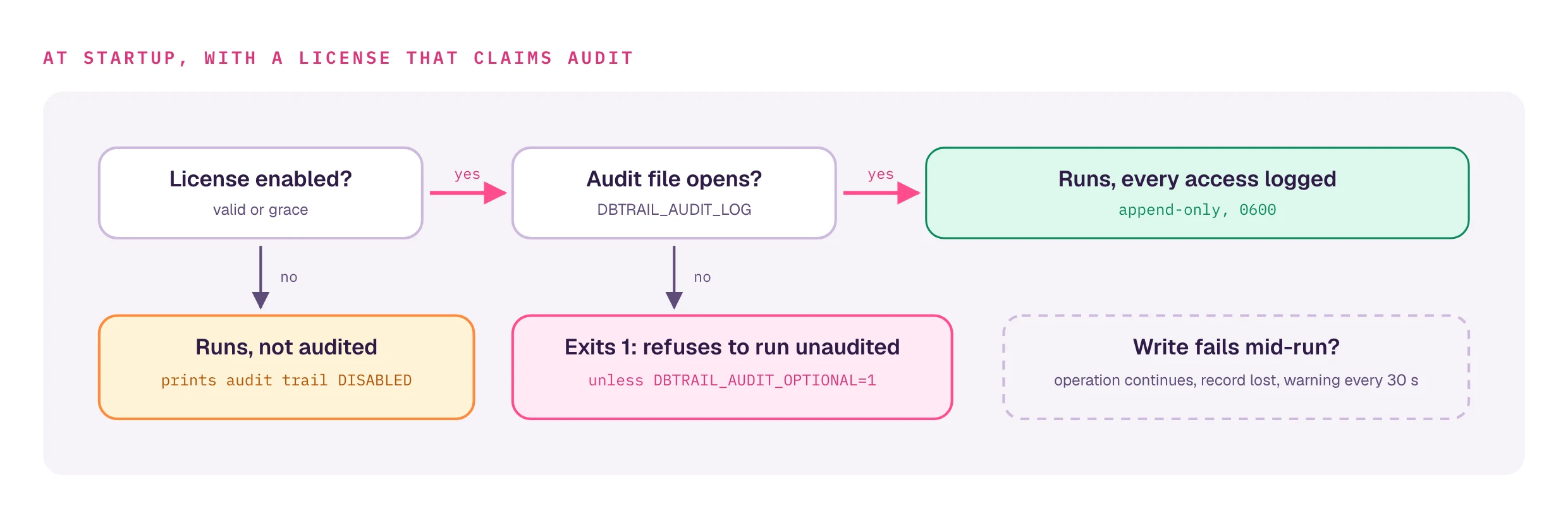
Parent directories are created as needed. The file is opened append-only, mode 0600 (audit lines routinely contain schema and primary-key detail), and each record is an unbuffered append: nothing is lost to a buffer on process exit.

# send the trail somewhere your log shipper already watches
export DBTRAIL_AUDIT_LOG=/var/log/myco/dbtrail-audit.jsonl

The JSONL format

One JSON object per line (the field names are the Go struct names, capitalized, no lowercasing). A query.run and a recover.generate line:

{"Time":"2026-07-16T14:03:22.481Z","Surface":"cli","Action":"query.run","Actor":"os:alice","Schema":"shop","Table":"orders","Detail":{"results":"12","format":"table"}}
{"Time":"2026-07-16T14:05:01.902Z","Surface":"cli","Action":"recover.generate","Actor":"os:alice profile:auditor","Schema":"shop","Table":"orders","Detail":{"statements":"3","dry_run":"false","output":"undo.sql","gtid":""}}

Because it is newline-delimited JSON, jq reads it directly:

jq -r 'select(.Action=="recover.generate") | "\(.Time) \(.Actor) \(.Schema).\(.Table)"' \
    /var/log/dbtrail/audit.jsonl

Fail-closed policy

A compliance control that silently disables is worse than an error. So the one deliberate exception to "a license state never stops dbtrail" lives here:

The gate

When the license is enabled (valid or grace) and claims the audit feature, and the audit sink cannot be opened at startup, dbtrail-ee exits non-zero (1) instead of running unaudited.

Note the precondition: the gate fires only for a live audit license. An expired or otherwise disabled audit license never trips fail-closed (nothing to audit into); instead it prints the DISABLED line described below.

The escape hatch. Set DBTRAIL_AUDIT_OPTIONAL=1 to downgrade the fail-closed exit to a warning and run without the trail:

DBTRAIL_AUDIT_OPTIONAL=1 dbtrail-ee query ...
# warning: audit trail unavailable (...) — DBTRAIL_AUDIT_OPTIONAL=1 set, operations will NOT be audited

The diagnostic exemption. Bricking the very commands you'd run to find out why the sink is broken would defeat the gate's purpose, so a fixed set of non-auditing invocations are allowed to run (with a warning) even when the sink is dead:

  • a bare dbtrail-ee with no arguments (prints usage);
  • -h / --help / -v / --version anywhere on the command line;
  • the subcommands license, help, and completion.

Every other command (query, recover, shim, reconstruct, status, verify, and the rest) performs an auditable operation and still fails closed. When in doubt the gate enforces.

If the sink is broken, the fail-closed error tells you how to fix it:

error: audit trail could not be initialized: <reason>
this license includes the "audit" feature; refusing to run unaudited (fail closed).
Fix the audit log destination (DBTRAIL_AUDIT_LOG, default /var/log/dbtrail/audit.jsonl) or set DBTRAIL_AUDIT_OPTIONAL=1 to run without the audit trail.

Write failures at runtime

Once the sink is open, a mid-run write failure (disk full, directory rotated away) never crashes or blocks an operation: a recovery must complete even if its audit line cannot be written. Instead:

  • the failed record is lost permanently (it is not retried or buffered), and
  • the failure surfaces as a rate-limited slog warning: at most one per 30 seconds, carrying the count of records lost since the last warning, so a persistent outage stays visible without drowning your logs:
audit: write failed — audit records are being LOST  path=/var/log/dbtrail/audit.jsonl error="..." lost_since_last_warning=137

Treat that warning as an incident: records written during the outage are gone.

When an audit license lapses

If a license that carries the audit feature is not currently enabled (expired, updates-lapsed, invalid, or a too-new schema), a dedicated line prints on every start, in addition to the generic license banner, so the loss of auditing is never silent:

audit trail DISABLED: license status "expired" — operations are NOT being audited. Renew at https://dbtrail.com/pricing or contact@dbtrail.com.

The remedy in that line tracks the cause: a schema mismatch says "upgrade dbtrail-ee", an updates lapse says "run a release within your updates window, or renew", and an expiry says "renew". See expiry, grace, and the updates window.


See also: Licensing · Enterprise features.

On this page