
dbtrail
dbtrail EE

Enterprise features

The canonical dbtrail EE feature registry (audit, forensics, rbac, sso) and how each one activates from your signed license
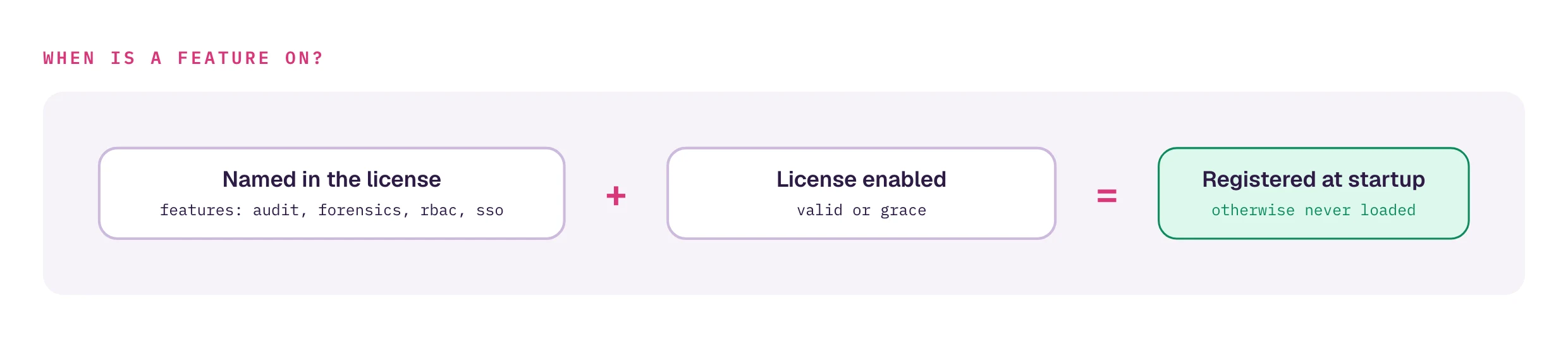
dbtrail-ee is the open-source dbtrail core plus a small set of enterprise features that turn on from your signed license. One binary serves everyone; a feature is active when the license features list names it and the license is enabled (valid or grace).

The recovery safety net is never licensed

An expired, invalid, or entirely absent license still runs the full free OSS core: capture, index, query, recover, reconstruct, verify, time-travel. Licenses gate the enterprise features below and nothing else. You can never be locked out of your own recovery.

Check what your license grants:

dbtrail-ee license      # the `features:` line lists your active features

The feature registry

FeatureWhat it gates
auditA JSONL audit trail of every auditable operation, fail-closed at startup. See Audit trail.
forensicsWho-changed attribution: the who-changed / user-activity / connection-history CLI commands, the Forensics view in the dbtrail-console-ee web console, the connection-identity cache poller (under up and the console watch/monitor daemons), the forensics doctor checks, and the agent's forensics WebSocket commands. See Forensics.
rbacConsole RBAC: per-user roles (admin / operator / analyst / viewer, enforced per route) and per-user data profiles (the OSS flag/profile/access rules, enforced server-side per session) in the dbtrail-console-ee web console: a multi-user local store behind the login form plus SSO claim→role mapping (DBTRAIL_SSO_ROLE_*). Unlicensed, the console behaves exactly like the OSS build: single local user, token, and (if sso is licensed) full-power SSO sessions. On a license lapse nobody's session is ever escalated: EE-defined users simply cannot log in, while the operator's built-in credentials keep working. See RBAC.
ssoConsole single sign-on: an OIDC "Continue with …" login for the dbtrail-console-ee web console, configured via DBTRAIL_SSO_*. Unlicensed, the button never appears and the console uses built-in token/password auth.

These four names are the canonical registry. A license cannot be minted with any other feature name, so dbtrail-ee license never shows a feature this binary doesn't understand.

What RBAC actually licenses

The free OSS core still ships the role-profile data machinery (flag/profile/access) for every user; what rbac licenses is the console-side enforcement: per-user identities, roles, and server-side application of those profiles per session. Holding the index DSN always grants direct database access; the CLI is therefore not an enforcement surface and is documented as out of scope.

How a feature activates

Activation is by registration at startup, and it is the entitlement gate in itself:

  • audit: when enabled and claimed, the audit sink is installed. If it cannot open, startup fails closed (unless DBTRAIL_AUDIT_OPTIONAL=1); see the fail-closed policy.
  • forensics: when enabled and claimed, the forensics commands and agent handlers are registered onto the binary. Without the feature they are simply never registered: dbtrail-ee who-changed reports an unknown command, and the agent answers its forensics commands with "unknown command type". There is no separate runtime check to defeat.
  • rbac: when enabled and claimed, the dbtrail-console-ee binary installs the multi-user credential backend on the console's login seam (only when the user store exists and is non-empty) and attaches the SSO claim→role mapping when configured. Without the feature nothing installs: the store is inert and only the built-in credentials authenticate. See RBAC.
  • sso: when enabled and claimed, the dbtrail-console-ee binary installs the OIDC provider on the console's auth seam. Without the feature the provider is never installed and the console uses built-in token/password auth only.

An enabled license is a valid or within-grace one. See the status words.


See also: Licensing · Audit trail · Forensics · RBAC.

On this page