
Installing DBTrail EE
From a delivered binary and license file to a running, licensed install, including the drop-in upgrade from the open-source core
| Binary | Is | Replaces |
|---|---|---|
dbtrail-ee | CLI: every bintrail command plus licensed CLI and agent features | bintrail |
dbtrail-console-ee | Web interface and capture daemon plus Forensics view, SSO, RBAC | bintrail-console |
Every OSS command and flag works unchanged. No license: the full core still runs (Enterprise features).
Install a delivered binary
# 1. binaries (the console archive is only needed for the web UI)
tar xzf dbtrail-ee_<version>_linux_amd64.tar.gz
tar xzf dbtrail-console-ee_<version>_linux_amd64.tar.gz
sudo install -m 0755 dbtrail-ee dbtrail-console-ee /usr/local/bin/
dbtrail-ee --version                      # <version>+ee

# 2. license (search order and DBTRAIL_LICENSE: see Licensing)
sudo install -D -m 0644 acme.lic /etc/dbtrail/license.lic

# 3. verify: exit 0 when enterprise features are on
dbtrail-ee license

# 4. run: needs a MySQL 8.0+ index, same as the core
dbtrail-ee up \
  --source-dsn 'user:pass@tcp(db:3306)/' \
  --index-dsn  'user:pass@tcp(index:3306)/bintrail_index'
Status words, grace and the updates window: Licensing. The quickstart and the OSS install guide apply verbatim.
Upgrading from the open-source core
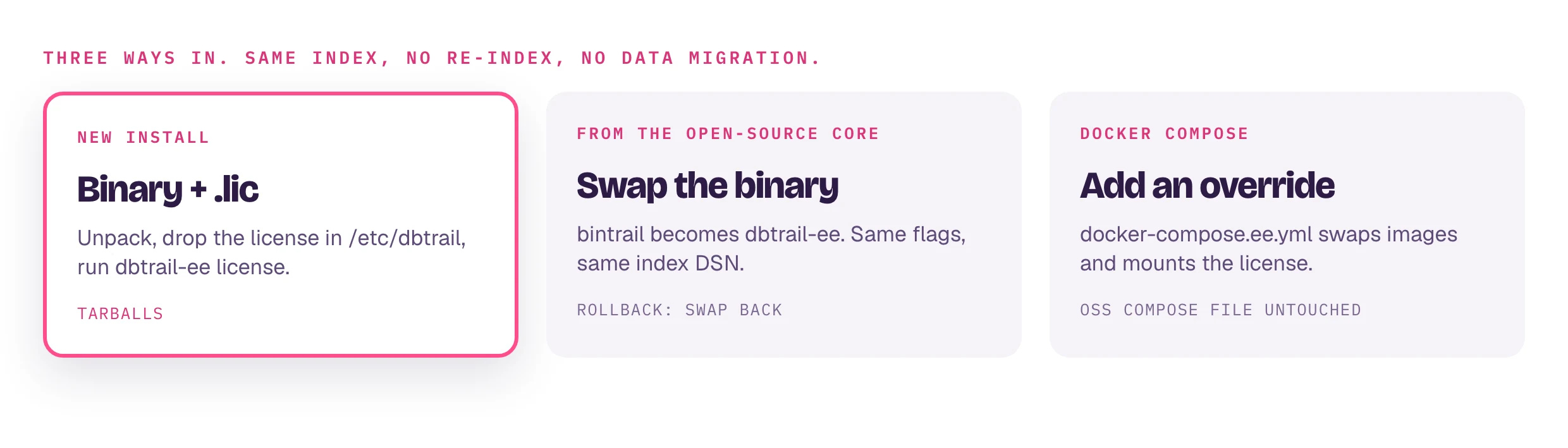
A binary swap, not a data migration: same index schema, your whole history stays queryable from the first second.
- Install the EE binaries next to or over
bintrail. - Keep your
--index-dsnand--source-dsn; swap the binary names in your service unit. On the OSS compose stack, add the override instead of editing it. - Drop in the license and run
dbtrail-ee license. You can also swap first and license later.
- Schema changes are additive. Newer core columns are added on first run;
old rows carry
NULL. - EE features start from now. Forensics' session ledger
(
session_history) records only sessions seen while EE runs. Older events are still attributed wherever an audit log or capturedquery_textcovers them: Forensics. - Rollback: point
bintrailback at the same index.session_historyis left unused.
Upgrading DBTrail EE
dbtrail-ee --version && dbtrail-console-ee --version   # version, commit, build date
dbtrail-ee license # updates until covers the new build?- License: no new file needed. Builds dated up to
updates untilrun licensed; a newer build runs as the plain core until you renew. Nothing is checked over the network. - Changelog: read the core CHANGELOG entries between the embedded core versions. BREAKING entries need a manual step and are not repeated later. Your delivery email names the core version.
- Swap: stop
dbtrail-console-ee watch, anydbtrail-ee streamunit and the shim; replace the binaries; start with the same flags and environment. Compose: bumpDBTRAIL_EE_TAGin.env, thenpullandup -d. - First run:
dbtrail-ee license(never touches the index), thendbtrail-ee status --index-dsn ..., which adds new columns.
Everything carries over: index and history, Parquet archives, baselines, server registry, web interface users, roles and access rules. Rolling back: an older build reads the grown schema fine, but a build older than a settings panel ignores that panel's store, so re-enter that configuration.
Docker Compose
Drop-in images for the core's docker-compose.yml:
| Image | Replaces |
|---|---|
ghcr.io/nethalo/dbtrail-console-ee | ghcr.io/dbtrail/bintrail-console |
ghcr.io/nethalo/dbtrail-ee | ghcr.io/dbtrail/bintrail |
- Public, no
docker login. Without a license they run as the core; the.licfile is the gate. - amd64 and arm64, with
bintrail/bintrail-consolesymlinks so the OSS compose commands run verbatim. - The EE CLI image does not ship
bintrail-mcp(use the web interface's/mcp) orbintrail-pg.
services:
  index-init:
    image: ghcr.io/nethalo/dbtrail-console-ee:${DBTRAIL_EE_TAG:-latest}

  bintrail:                     # watch daemon: capture + console
    image: ghcr.io/nethalo/dbtrail-console-ee:${DBTRAIL_EE_TAG:-latest}
    volumes:
      - ${DBTRAIL_LICENSE_FILE:-./dbtrail.lic}:/etc/dbtrail/license.lic:ro
      - bintrail-console-home:/home/bintrail

  shim:                         # opt-in flashback profile; license keeps it audited
    image: ghcr.io/nethalo/dbtrail-ee:${DBTRAIL_EE_TAG:-latest}
    volumes:
      - ${DBTRAIL_LICENSE_FILE:-./dbtrail.lic}:/etc/dbtrail/license.lic:ro

  baseline:                     # opt-in baseline profile
    image: ghcr.io/nethalo/dbtrail-ee:${DBTRAIL_EE_TAG:-latest}
    volumes:
      - ${DBTRAIL_LICENSE_FILE:-./dbtrail.lic}:/etc/dbtrail/license.lic:ro

volumes:
  bintrail-console-home:
cp acme.lic ./dbtrail.lic # must exist before up: a missing bind source becomes a directory
chmod 0644 ./dbtrail.lic # container user is uid 999; unreadable = plain core
docker compose -f docker-compose.yml -f docker-compose.ee.yml pull
docker compose -f docker-compose.yml -f docker-compose.ee.yml up -d
docker compose exec bintrail dbtrail-console-ee license # status: validSame volumes and data as the binary upgrade. Pin with DBTRAIL_EE_TAG, move
the license with DBTRAIL_LICENSE_FILE.
Always pull before up
up -d never re-pulls a :latest already on the host. Skip pull and you
keep the old build.
Rollback: up -d without the second -f. The stack returns to the OSS
images on the untouched volumes.
Running the web interface
dbtrail-console-ee serve --index-dsn '...' --listen 127.0.0.1:8090          # read-only UI
dbtrail-console-ee watch --index-dsn '...' --console-listen 127.0.0.1:8090 # capture + console + control plane- Auth (from the open-source web interface):
loopback first run asks for a password; a non-loopback bind needs
--token, a configured password, or--allow-setup, or it refuses to start. dbtrail-console-ee licensehas the same output and exit code as the CLI.- Licensed pieces appear only when granted: Forensics view and its poller
under
watch(Forensics), SSO viaDBTRAIL_SSO_*, RBAC users and SSO role mapping (RBAC). Unlicensed, the web interface is the OSS build.